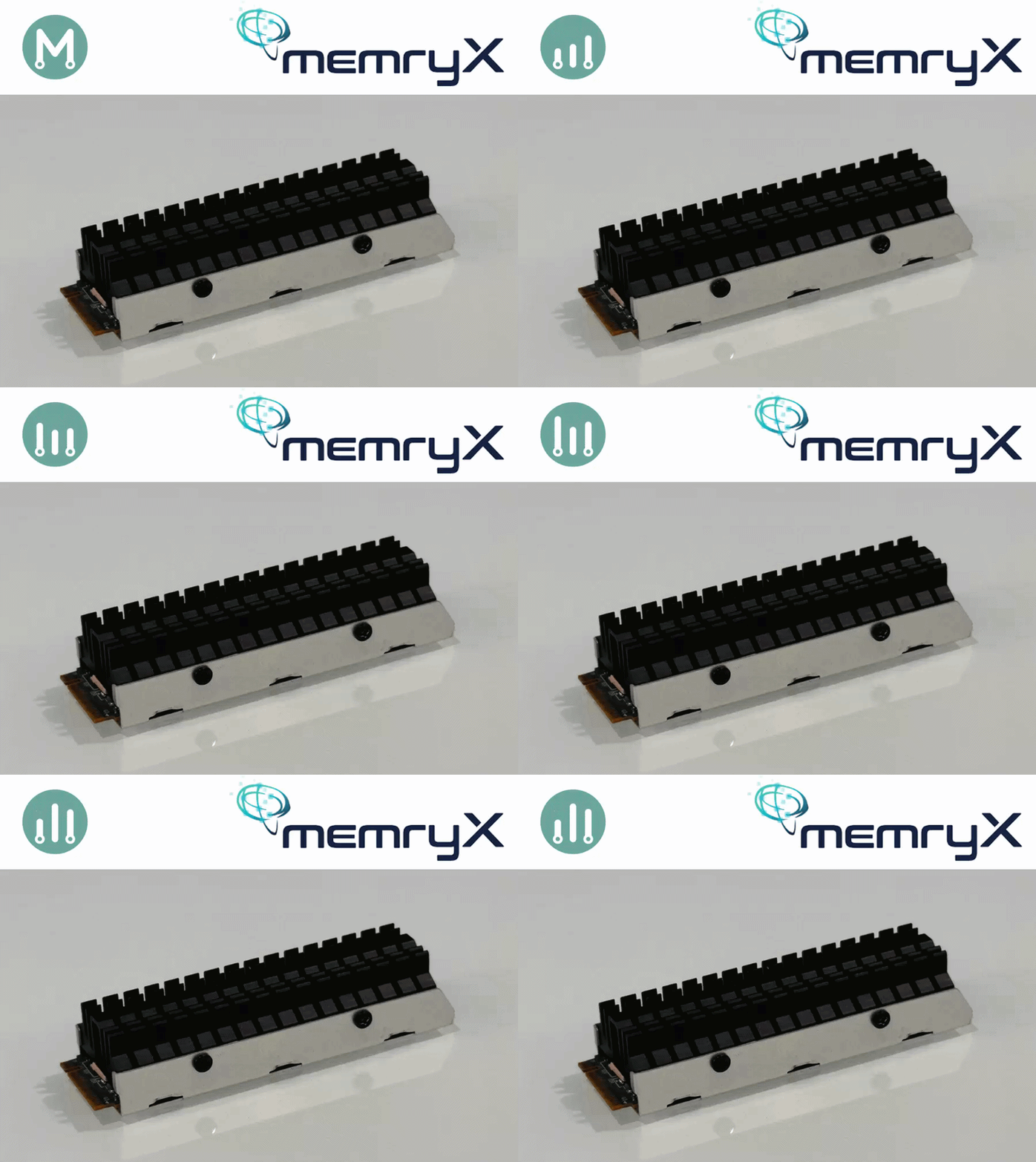
In Parts 1–3, we established a methodology for independent power measurement on edge AI accelerators. In Parts 4 and 5, we applied it to the Axelera Metis and the DeepX M1.
Series: Edge AI Power Benchmarking
- Part 1: Hailo-8, the Reference Methodology
- Part 2: Power Insertion with ElmorLabs
- Part 3: Measuring Edge AI Power with INA228
- Part 4: Measuring the Power Efficiency of Axelera Metis
- Part 5: Measuring the Power Efficiency of DeepX M1
- Part 6: Measuring the Power Efficiency of MemryX MX3 (this post)
Now we apply the same methodology to the MemryX MX3 M.2 acceleration module.
Installing the MemryX SDK
MemryX provides excellent instructions on installing their driver, runtime, and tools:
After installation, where I created a “venv-mx” python virtual environment, I was able to confirm the presence of the MemryX MX3 module with the mx_bench utility:
(venv-mx) $ mx_bench --hello
Hello from MXA!

Device ID | Chip Count |  Freq | Volt
----------|------------|-------|-----
        0 |          4 |   600 |  700
Reproducing the MemryX benchmarks
Before measuring power, I wanted to reproduce MemryX’s published benchmark. In line with the previous articles, I chose ResNet50, knowing it has the lightest post-processing stage, being a classification model.
- MemryX Model Zoo
- ResNet-50 (MXA-Optimized)
- 14 TFLOPS (600 MHz) : 1778 FPS
- 20 TFLOPS (850 MHz) : 2317 FPS
- ResNet-50 (MXA-Optimized)
They publish two different benchmarks. The first benchmark corresponds to the default configuration (600 MHz clock). The second benchmark is taken in over-clocked mode (850 MHz clock).
Our initial target is to reproduce the benchmark of 1778 FPS.
I will attempt to perform the same in over-clocked mode, but am not certain if my host will support this.
In order to measure the FPS metric for the ResNet50 model, I downloaded the following files from the MemryX model zoo:
Throughput results at 14 TFLOPS
MemryX provides a benchmarking utility, mx_bench, that takes a .dfp compiled model and a frame count, and reports average FPS and system latency:
(venv-mx) $ mx_bench -v -d ResNet_50_MXA_Optimized_224_224_3_onnx.dfp -f 50000

╭─────────────────┬─────┬─────┬────────╮
│                 │     │     │        │
│                 │           ├────    │
│     │     │     ╞══       ══╡        │
│     │     │     │           ├────    │
│     │     │     │     │     │        │
╰─────┴─────┴─────┴─────┴─────┴────────╯

╔══════════════════════════════════════╗
║               Benchmark              ║
║  Copyright (c) 2019-2026 MemryX Inc. ║
╚══════════════════════════════════════╝

Ran 50000 frames
  Model: 0
  Average FPS: 1796.36
  Average System Latency: 3.24 ms

(venv-mx) $ mx_bench -v -d ResNet_50_MXA_Optimized_224_224_3_onnx.dfp -f 50000

╭─────────────────┬─────┬─────┬────────╮
│                 │     │     │        │
│                 │           ├────    │
│     │     │     ╞══       ══╡        │
│     │     │     │           ├────    │
│     │     │     │     │     │        │
╰─────┴─────┴─────┴─────┴─────┴────────╯

╔══════════════════════════════════════╗
║               Benchmark              ║
║  Copyright (c) 2019-2026 MemryX Inc. ║
╚══════════════════════════════════════╝

Ran 50000 frames
  Model: 0
  Average FPS: 1796.36
  Average System Latency: 3.31 ms
Two back-to-back runs on the same module land at exactly the same throughput of 1796.36 FPS, with latency varying only slightly (3.24 ms vs. 3.31 ms).
Not only did I match MemryX’s published 14 TFLOPS (600MHz) benchmark of 1778 FPS, I exceeded it by ~1%, hitting 1796 FPS.
Throughput results at 20 TFLOPS
In order to access the 20 TFLOPS performance of the MemryX MX3, I need to over-clock to 850MHz.
This can be done with the mx_set_powermode command:
(venv-mx) $ sudo mx_set_powermode
Once in the MX3 Power Tweak Utility’s GUI, select:
- 1 - Set Power Mode (4-chip module)
- 9 - 850 MHz
- OK
- 3- Exit
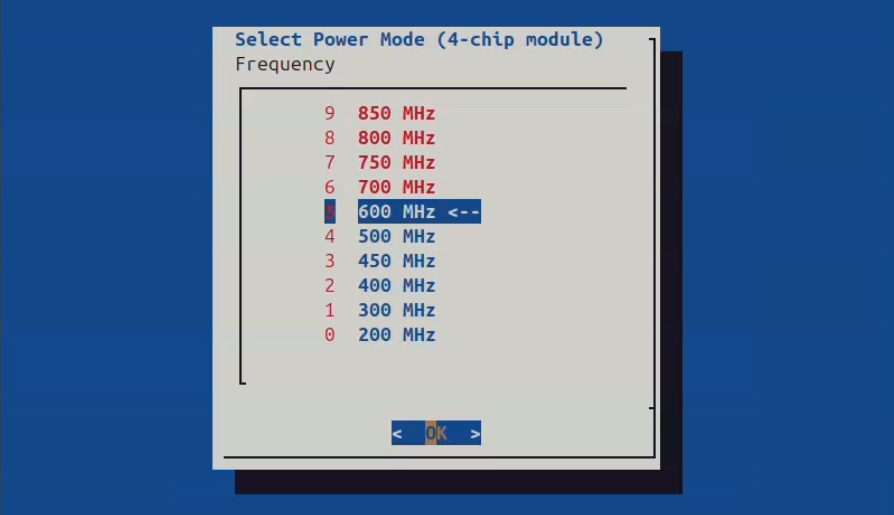
The fact that all frequencies above 600 MHz are in RED is probably a foreshadowing of what was going to happen, but I moved ahead with 850 MHz just the same.
I noticed that the frequency change only took effect after a reboot.
(venv-mx) $ mx_bench --hello
Hello from MXA!

Device ID | Chip Count |  Freq | Volt
----------|------------|-------|-----
        0 |          4 |   850 |  780

(venv-mx) abbeefai@AlbertaBeefAI:/media/abbeefai/TheExpanse/memryx$ mx_bench -v -d ResNet_50_MXA_Optimized_224_224_3_onnx.dfp -f 50000

╭─────────────────┬─────┬─────┬────────╮
│                 │     │     │        │
│                 │           ├────    │
│     │     │     ╞══       ══╡        │
│     │     │     │           ├────    │
│     │     │     │     │     │        │
╰─────┴─────┴─────┴─────┴─────┴────────╯

╔══════════════════════════════════════╗
║               Benchmark              ║
║  Copyright (c) 2019-2026 MemryX Inc. ║
╚══════════════════════════════════════╝

Ran 50000 frames
  Model: 0
  Average FPS: 2335.41
  Average System Latency: 2.76 ms

(venv-mx) $ mx_bench -v -d ResNet_50_MXA_Optimized_224_224_3_onnx.dfp -f 100000

╭─────────────────┬─────┬─────┬────────╮
│                 │     │     │        │
│                 │           ├────    │
│     │     │     ╞══       ══╡        │
│     │     │     │           ├────    │
│     │     │     │     │     │        │
╰─────┴─────┴─────┴─────┴─────┴────────╯

╔══════════════════════════════════════╗
║               Benchmark              ║
║  Copyright (c) 2019-2026 MemryX Inc. ║
╚══════════════════════════════════════╝

Ran 100000 frames
  Model: 0
  Average FPS: 1887.61
  Average System Latency: 2.42 ms

(venv-mx) $ mx_bench -v -d ResNet_50_MXA_Optimized_224_224_3_onnx.dfp -f 200000

╭─────────────────┬─────┬─────┬────────╮
│                 │     │     │        │
│                 │           ├────    │
│     │     │     ╞══       ══╡        │
│     │     │     │           ├────    │
│     │     │     │     │     │        │
╰─────┴─────┴─────┴─────┴─────┴────────╯

╔══════════════════════════════════════╗
║               Benchmark              ║
║  Copyright (c) 2019-2026 MemryX Inc. ║
╚══════════════════════════════════════╝

Ran 200000 frames
  Model: 0
  Average FPS: 1425.14
  Average System Latency: 2.46 ms
This is a fascinating capture.
For a cold-run, I was able to exceed the published benchmark of 2317 FPS by ~0.8%, with a benchmark of 2335 FPS.
However, as the temperature of the MX3 module increased, we quickly hit 100°C, which triggered thermal throttling.
Ultimately, due to the high temperature and thermal throttling, our performance degraded down to 1887 FPS, then 1425 FPS.
These are EXACTLY the thermal dynamics I want to explore in more detail in future exploration.
Since this initial series is only concerned with the vendor’s published benchmarks, which seem to be performed in ideal cold-run scenarios, I will keep the first of the three runs in my power efficiency evaluation.
Measuring MemryX MX3 Power with mb-powermon.py
We will use the methodology that we established in Part 3, using a custom INA228 based power measurement tool.
Also, we will use the same mb-powermon.py utility we have been using throughout the series:
Within the MemryX virtual environment, install the “pyftdi”, “adafruit-blinka”, and “adafruit-circuitpython-ina228” python packages:
(venv-mx) $ pip3 install pyftdi adafruit-blinka adafruit-circuitpython-ina228
Make certain you have permission to access the enumerated FTDI USB device (the same fix-ft232h-permissions.sh script from Parts 3–5 applies here).
Measuring MemryX MX3 Power at 14 TFLOPS
After configuring the MX3 for 14 TFLOPS (600 MHz clock), and rebooting, launch the mb-powermon utility as follows:
(venv-mx) $ python3 mb-powermon.py --probe memryx,adafruit --csv mb-powermon-memryx-ina228-resnet50-20260521-14tflops.csv
If we re-run the inference in a separate console:
(venv-mx) $ mx_bench --hello
Hello from MXA!

Device ID | Chip Count |  Freq | Volt
----------|------------|-------|-----
        0 |          4 |   600 |  700

(venv-mx) $ mx_bench -v -d ResNet_50_MXA_Optimized_224_224_3_onnx.dfp -f 50000

╭─────────────────┬─────┬─────┬────────╮
│                 │     │     │        │
│                 │           ├────    │
│     │     │     ╞══       ══╡        │
│     │     │     │           ├────    │
│     │     │     │     │     │        │
╰─────┴─────┴─────┴─────┴─────┴────────╯

╔══════════════════════════════════════╗
║               Benchmark              ║
║  Copyright (c) 2019-2026 MemryX Inc. ║
╚══════════════════════════════════════╝

Ran 50000 frames
  Model: 0
  Average FPS: 1796.42
  Average System Latency: 3.27 ms

(venv-mx) $ mx_bench -v -d ResNet_50_MXA_Optimized_224_224_3_onnx.dfp -f 100000

╭─────────────────┬─────┬─────┬────────╮
│                 │     │     │        │
│                 │           ├────    │
│     │     │     ╞══       ══╡        │
│     │     │     │           ├────    │
│     │     │     │     │     │        │
╰─────┴─────┴─────┴─────┴─────┴────────╯

╔══════════════════════════════════════╗
║               Benchmark              ║
║  Copyright (c) 2019-2026 MemryX Inc. ║
╚══════════════════════════════════════╝

Ran 100000 frames
  Model: 0
  Average FPS: 1796.46
  Average System Latency: 3.29 ms

(venv-mx) $ mx_bench -v -d ResNet_50_MXA_Optimized_224_224_3_onnx.dfp -f 200000

╭─────────────────┬─────┬─────┬────────╮
│                 │     │     │        │
│                 │           ├────    │
│     │     │     ╞══       ══╡        │
│     │     │     │           ├────    │
│     │     │     │     │     │        │
╰─────┴─────┴─────┴─────┴─────┴────────╯

╔══════════════════════════════════════╗
║               Benchmark              ║
║  Copyright (c) 2019-2026 MemryX Inc. ║
╚══════════════════════════════════════╝

Ran 200000 frames
  Model: 0
  Average FPS: 1796.54
  Average System Latency: 3.27 ms
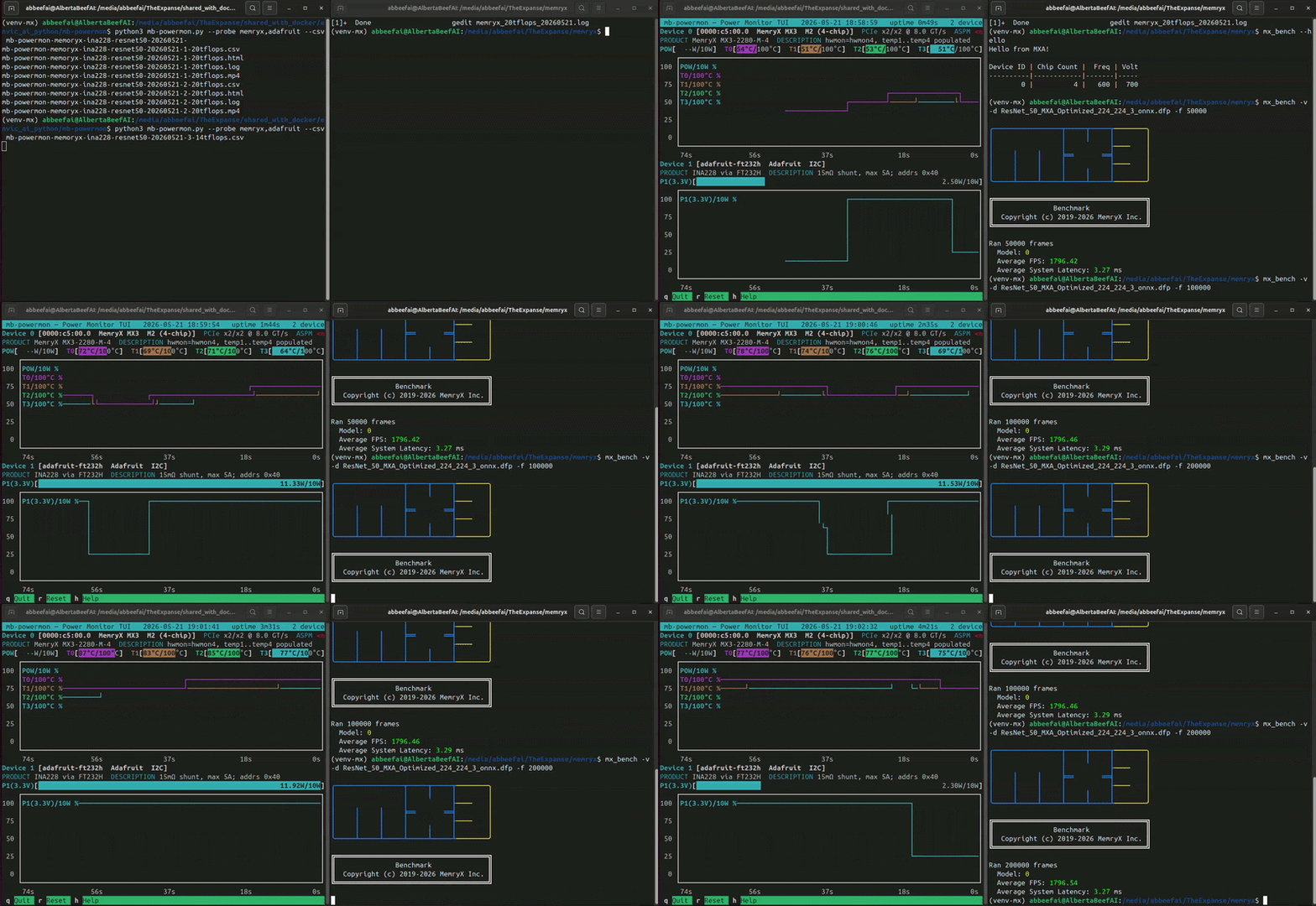
While this is running, you will see something similar to the following (video playing at 10x speed):
If we convert the output .csv file to a user-friendly .html, we can plot power and temperature for the runs:
(venv) $ python3 csv-to-html-plot.py --input mb-powermon-memryx-ina228-resnet50-20260521-14tflops.csv --output mb-powermon-memryx-ina228-resnet50-20260521-14tflops.html
The INA228 reports a wide range of values during the three runs. Contrary to the other vendors where the power mostly stabilized, the power readings on MX3 are constantly rising. the first run increased to ~11.0 W, the second to ~11.4 W, and the third to ~12.1 W. This rise is mostly likely caused by the on-die temperature readings rising to ~65°C, ~70°C, then ~90°C during each run.
Since this series of articles is concerned with the cold-runs, aiming only to reproduce the vendor’s best case scenarios, I will take the first result of ~11.0 W for comparison purposes.
Measuring MemryX MX3 Power with its on-board telemetry
After my initial results, MemryX sent me a sample of their MX3 module, with on-board telemetry. This allowed me to validate, in a similar fashion to the Hailo-8 module, my independant power measurement methodology.
The first thing that jumps out with these results is that the INA228 measurements are slightly higher than MemryX’s own measurements.
This is the expected behavior. Each shunt resistor drops a small voltage across itself, leaving the load downstream with slightly less supply voltage. Since P = V · I, the load consumes slightly less power, and any downstream sense resistor reads correspondingly lower. The INA228 sits upstream of MemryX’s internal shunt, which contributes to the readings being higher.
Measuring MemryX MX3 Power at 20 TFLOPS
After configuring the MX3 for 20 TFLOPS (850 MHz clock), and rebooting, launch the mb-powermon utility as follows:
(venv-mx) $ python3 mb-powermon.py --probe memryx,adafruit --ina228-max-current 10 --power-max 25.0 --csv mb-powermon-memryx-ina228-resnet50-20260521-20tflops.csv
Notice that we specified two additional arguments for this run:
- –ina228-max-current 10
- increase max current to 10A
- otherwise we get NULL readings when the current is beyond the default max of 5A
- –power-max 25.0
- for better viewing of this high power session
If we re-run the inference in a separate console:
(venv-mx) $ mx_bench --hello
Hello from MXA!

Device ID | Chip Count |  Freq | Volt
----------|------------|-------|-----
        0 |          4 |   850 |  780

(venv-mx) $ mx_bench -v -d ResNet_50_MXA_Optimized_224_224_3_onnx.dfp -f 50000

╭─────────────────┬─────┬─────┬────────╮
│                 │     │     │        │
│                 │           ├────    │
│     │     │     ╞══       ══╡        │
│     │     │     │           ├────    │
│     │     │     │     │     │        │
╰─────┴─────┴─────┴─────┴─────┴────────╯

╔══════════════════════════════════════╗
║               Benchmark              ║
║  Copyright (c) 2019-2026 MemryX Inc. ║
╚══════════════════════════════════════╝

Ran 50000 frames
  Model: 0
  Average FPS: 2335.41
  Average System Latency: 2.76 ms

(venv-mx) $ mx_bench -v -d ResNet_50_MXA_Optimized_224_224_3_onnx.dfp -f 100000

╭─────────────────┬─────┬─────┬────────╮
│                 │     │     │        │
│                 │           ├────    │
│     │     │     ╞══       ══╡        │
│     │     │     │           ├────    │
│     │     │     │     │     │        │
╰─────┴─────┴─────┴─────┴─────┴────────╯

╔══════════════════════════════════════╗
║               Benchmark              ║
║  Copyright (c) 2019-2026 MemryX Inc. ║
╚══════════════════════════════════════╝

Ran 100000 frames
  Model: 0
  Average FPS: 1887.61
  Average System Latency: 2.42 ms

(venv-mx) $ mx_bench -v -d ResNet_50_MXA_Optimized_224_224_3_onnx.dfp -f 200000

╭─────────────────┬─────┬─────┬────────╮
│                 │     │     │        │
│                 │           ├────    │
│     │     │     ╞══       ══╡        │
│     │     │     │           ├────    │
│     │     │     │     │     │        │
╰─────┴─────┴─────┴─────┴─────┴────────╯

╔══════════════════════════════════════╗
║               Benchmark              ║
║  Copyright (c) 2019-2026 MemryX Inc. ║
╚══════════════════════════════════════╝

Ran 200000 frames
  Model: 0
  Average FPS: 1425.14
  Average System Latency: 2.46 ms
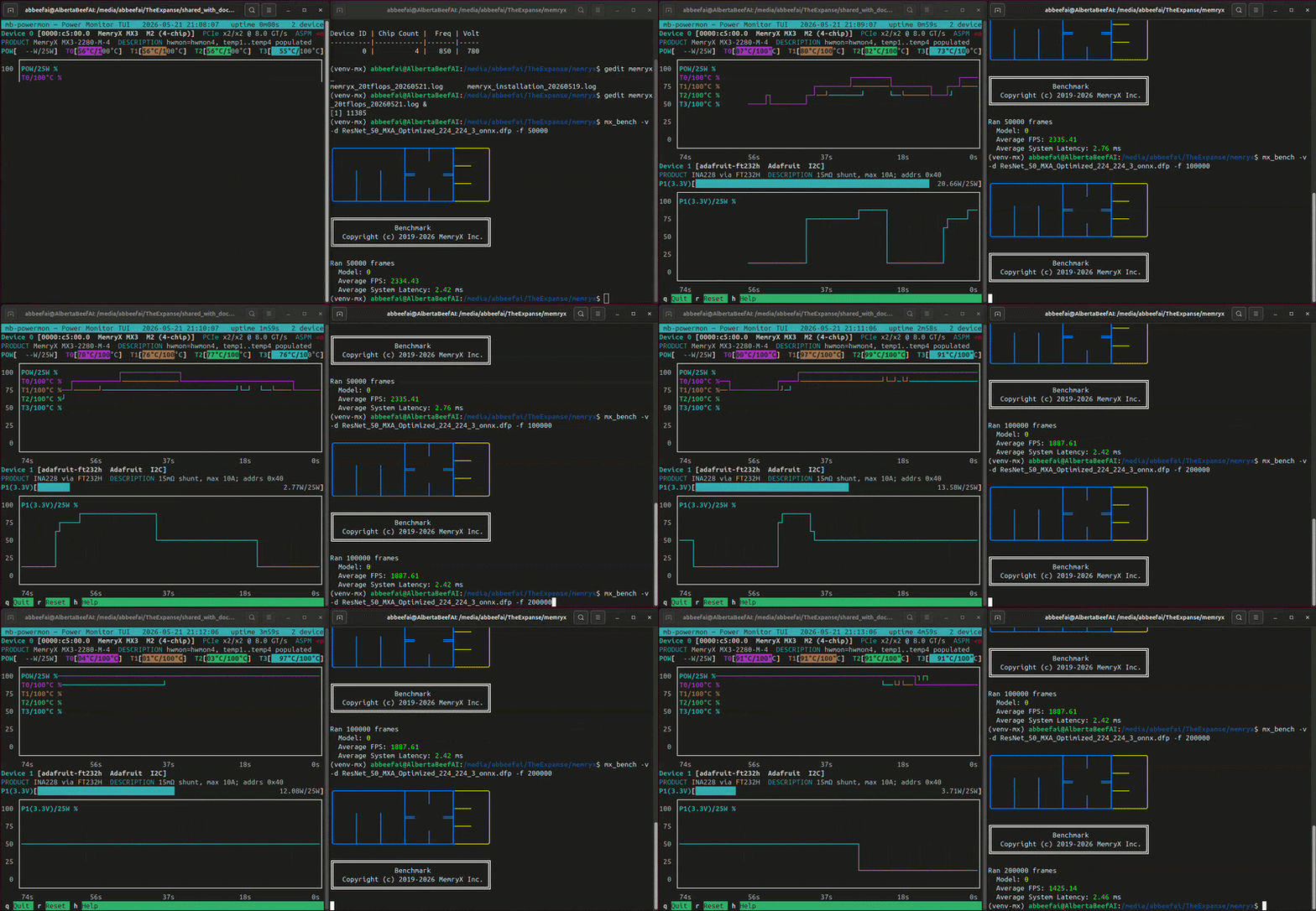
While this is running, you will see something similar to the following (video playing at 10x speed):
If we convert the output .csv file to a user-friendly .html, we can plot power and temperature for the runs:
(venv) $ python3 csv-to-html-plot.py --input mb-powermon-memryx-ina228-resnet50-20260521-20tflops.csv --output mb-powermon-memryx-ina228-resnet50-20260521-20tflops.html
The INA228 reports an average of ~20.2 W during the first run, with the on-die temperature readings quickly rising to ~90°C.
For a short cold-run session, the MX3 achieved 2335 FPS at 20.2 W, for a power efficiency of 116 FPS/W.
If we look at the second and third runs, we see the MX3’s protective thermal throttling start to kick in. Each time the on-die temperatures reach 100°C, we see the power drop. Despite this, we observed the on-die temperature reach 107°C at the end of the third run.
Thermal Considerations
It is very obvious in the 14 TFLOPS results that for the same throughput, we observe different power consumption values (~11.0W, ~11.4 W, ~12.1 W).
This is due to temperature. The hotter the MemryX MX3 silicon gets, and the more power it draws to sustain the same workload.
MemryX provides four temperature readings, corresponding to each of the four MX3 chips:
- T0 => hottest
- T1
- T2
- T3
Since the first chip is the entry point to the module, it carries the host-side I/O load on top of its share of the inference pipeline, which explains why T0 reads hotter than the other three.
Thermal Throttling
MemryX documents the thermal throttling mechanism in their developer hub’s troubleshooting page:
- https://developer.memryx.com/support/troubleshooting/runtime.html
- Insufficient M.2 cooling
Each MX3 chip on the M.2 must be kept below 100 °C; otherwise, it will start to thermal throttle by reducing its frequency by 50%.
The throttle status of each chip (along with its temperature) can be monitored at “/sys/memx0/temperature”:
$ watch cat /sys/memx0/temperature

Every 2.0s: cat /sys/memx0/temperature

CHIP(0) PVT3 Temperature: Temperature: 62 C (335 Kelvin) (ThermalThrottlingState: 0)
CHIP(1) PVT3 Temperature: Temperature: 61 C (334 Kelvin) (ThermalThrottlingState: 0)
CHIP(2) PVT3 Temperature: Temperature: 62 C (335 Kelvin) (ThermalThrottlingState: 0)
CHIP(3) PVT3 Temperature: Temperature: 62 C (335 Kelvin) (ThermalThrottlingState: 0)
(The same information is also available programmatically via the MemryX Runtime APIs.)
If we analyze our session of three runs at 20 TFLOPS:
| Run | On-die temperature | Throughput | % of cold-run |
|---|---|---|---|
| Run 1 (cold-run) | ≤ 90°C | 2335 FPS | 100 % |
| Run 2 | hit 100°C | 1887 FPS | 81 % |
| Run 3 | back to 100°C | 1425 FPS | 61 % |
We can see that for Run 2, only one chip (TS0) hit 100 °C, and was therefore throttled at 50%.
For Run 3, we can see each of the four chips hitting reaching 100°C in succession. The first chip (TS0) at the start of the run. The second and third chips (TS1, TS2) in the middle on the run. The fourth chip (TS3) near the end of the run. At their peak, the four chips reached temperatures of TS0=106°C, TS1=103°C, TS2=106°C, and TS3=100°C, and had triggered their thermal throttling, within only 5 minutes into the session.
For sustained 20 TFLOPS throughput, an active cooling solution that keeps all four chips below ~95 °C would be required. Without it, only the first run of a 20 TFLOPS benchmark session reflects the boosted clock — every subsequent run averages a growing fraction of throttled-bottleneck time.
Idle Power
For power-sensitive applications, it is useful to know what the MemryX MX3 module draws when it is powered up but not running inference.
On my AMD Ryzen AI MAX+ 395 PC, which supports ASPM, the MemryX MX3 module negotiated ASPM as off.
I have measured two distinct idle power levels:
- 1.28 W - ASPM off - after boot, before any AI inference
- 1.92 W - ASPM off - idle, after AI inference
Since my interest in idle power is between AI inference sessions, I will ignore the pre-inference idle power measurement.
For always-on applications which are not continually performing inference, this idle power is a benchmark in itself:
| Manufacturer | Accelerator | State | ASPM | Fan | Power |
|---|---|---|---|---|---|
| Hailo | Hailo-8 (M.2) | idle | L1 | no | 0.5 W |
| Hailo | Hailo-8 (M.2) | idle | off | no | 0.8 W |
| Axelera | Metis (M.2) | idle | off | no | 2.9 W |
| Axelera | Metis (M.2) | idle | off | yes | 3.1 W |
| DeepX | M1 (M.2) | idle | L1 | no | 0.74 W |
| DeepX | M1 (M.2) | idle | off | no | 1.04 W |
| MemryX | MX3 (M.2) | idle | off | no | 1.9 W |
Known Issue with Earlier MX3 modules
With the earlier MX3 modules I already had in my possession, I ran into an issue with where my PC not booting with the MemryX module.
On my AMD Ryzen AI MAX+ 395 PC, I had to change the “Re-Size BAR” configuration to “disabled”, in order to perform this investigation.
$ lspci -vvv
...
c5:00.0 Processing accelerators: MemryX MX3
    ...
	Region 0: Memory at 80000000 (32-bit, non-prefetchable) [size=256M]
	Region 1: Memory at 90000000 (32-bit, non-prefetchable) [size=1M]
	...
...
The MX3 exposes a fixed 256MB 32-bit non-prefetchable BAR, which means it must be placed in the sub-4GB MMIO window and cannot be relocated above it. With Re-Size BAR enabled, the firmware grants large resizable windows to other devices (most notably the Radeon iGPU) and on a platform without an exposed “Above 4G Decoding” option, this over-commits the sub-4GB space and leaves no contiguous slot for the MX3’s fixed BAR, causing the hanging during boot. Disabling Re-Size BAR forces conservative BAR placement and the MX3 lands cleanly at 0x80000000.
On my AMD Ryzen AI MAX+ 395, both the integrated Radeon iGPU and XDNA NPU remain fully functional with Re-Size BAR disabled. What’s lost is the ReBAR/SAM optimization for the iGPU, which slightly reduces theoretical throughput in workloads that benefit from it.
This issue does not exist with recent MX3 modules, as it allocated two smaller BARs, instead of one large BAR.
$ lspci -vvv
...
c5:00.0 Processing accelerators: MemryX MX3
    ...
	Region 0: Memory at cc000000 (64-bit, non-prefetchable) [size=16M]
	Region 2: Memory at cb000000 (64-bit, non-prefetchable) [size=16M]
	Region 4: Memory at cd000000 (32-bit, non-prefetchable) [size=1M]
	...
...
Conclusion
In this article, we have successfully applied our power measurement methodology to the MemryX MX3 M.2 module.
On MemryX’s MXA-optimized resnet50 model, the MX3 configured for 14 TFLOPS (600 MHz) delivers 1796 FPS at ~11.0 W — roughly 163 FPS/W.
This is very impressive throughput, placing the MX3 in second place at 1796 FPS. With its higher power consumption, however, it falls in the last place in terms of power efficiency for resnet50.
Although the MX3 takes first place with 2335 FPS when in 20 TFLOPS mode, it cannot hold on to this crown due to thermal throttling.
| Manufacturer | Accelerator | Model | Throughput | Power | Efficiency |
|---|---|---|---|---|---|
| Hailo | Hailo-8 (M.2) | resnet50 | 1371 FPS | 4.0 W | 343 FPS/W |
| Axelera | Metis (M.2) | resnet50 | 2050 FPS | 7.6 W | 270 FPS/W |
| DeepX | M1 (M.2) | resnet50 | 1009 FPS | 4.7 W | 214 FPS/W |
| MemryX | MX3 (M.2) 14 TFLOPS | resnet50 | 1796 FPS | 11.0 W | 163 FPS/W |
| MemryX | MX3 (M.2) 20 TFLOPS | resnet50 | 2335 FPS | 20.2 W | 116 FPS/W |
NOTE: The MX3 (M.2) 20 TFLOPS benchmark is unsustainable, since it quickly hits 100°C, and undergoes thermal throttling. This mode would require a more aggresive thermal dissipation solution, such as Thermalright HR10 PRO.
It is important to note that the Axelera Metis module has LPDDR, where-as the Hailo-8 and MemryX MX3 modules do not. Also, the MemryX module has 2 lanes, where-as the others have 4.
| Manufacturer | Accelerator | PCIe lanes | SRAM | LPDDR |
|---|---|---|---|---|
| Hailo | Hailo-8 (M.2) | 4 | undisclosed | none |
| Axelera | Metis (M.2) | 4 | 52 MB | 1 GB LPDDR4X |
| DeepX | M1 (M.2) | 4 | undisclosed | 4 GB LPDDR5 |
| MemryX | MX3 (M.2) | 2 | 62 MB (42 MB weight + 20 MB feature-map) | none |
One of the new features from MemryX is that we no longer need to combine models into a single DFP, for multi-inference pipelines. This is definitely a feature that I want to evaluate in future exploration.
The ease of use of the MemryX flow cannot be overstated here. As an industry example of adoption, it is worth noting that MemryX MX3 is the only M.2 AI Accelerator currently supported by Edge Impulse.
What Next?
I have followed a consistent methodology for these comparative benchmarks:
- reproduce the manufacturer’s published ResNet-50 benchmark with their utilities
- use manufacturer’s provided (default) thermal solution
- measure power independently during a cold-run
- rank power efficiency based on FPS/W
That said, I still do not know exactly what is happening inside each manufacturer’s benchmarking code. An ideal comparison would use the same vendor-independent code for everything except inference.
Finally, it is important to note that benchmarking a single simple network (i.e. ResNet-50) does not tell the whole story. Some larger models simply do not fit on certain accelerators. Others contain layers that are not supported by the vendor’s software solution.
In future articles, I will explore a more diverse and representative collection of models using vendor-independent code, and also cover multi-inference cascade pipelines. This will reveal the many complex layers of edge AI benchmarking.
If there are models, applications, or thermal conditions you would like to see covered, I invite you to reach out to me at:
Vendor Engagement Disclaimer
I already had in hand several MemryX modules, which were provided for previous articles:
The drafts of this article were shared with MemryX prior to publication.
For this article, MemryX provided a sample of recent MemryX MX3 module with on-board power telemetry.
| Model Number | BAR | Power telemetry | Description |
|---|---|---|---|
| MX-M | 256M | n/a | Earlier MX3 module |
| MX-MF | 16M+16M | n/a | Recent MX3 module |
| MX-MFG | 16M+16M | supported | Recent MX3 module with current sensor |
MemryX confirmed that 20 TFLOPS operation can be maintained with the following thermal solution:
Version History
| Date | Description |
|---|---|
| 2026/05/22 | Initial Draft |
| 2026/06/04 | Incorporate Vendor Feedback |