In Parts 1–3, we established a methodology for independent power measurement on edge AI accelerators. In Part 4, we applied it to the Axelera Metis.
Series: Edge AI Power Benchmarking
- Part 1: Hailo-8, the Reference Methodology
- Part 2: Power Insertion with ElmorLabs
- Part 3: Measuring Edge AI Power with INA228
- Part 4: Measuring the Power Efficiency of Axelera Metis
- Part 5: Measuring the Power Efficiency of DeepX M1 (this post)
- Part 6: Measuring the Power Efficiency of MemryX MX3
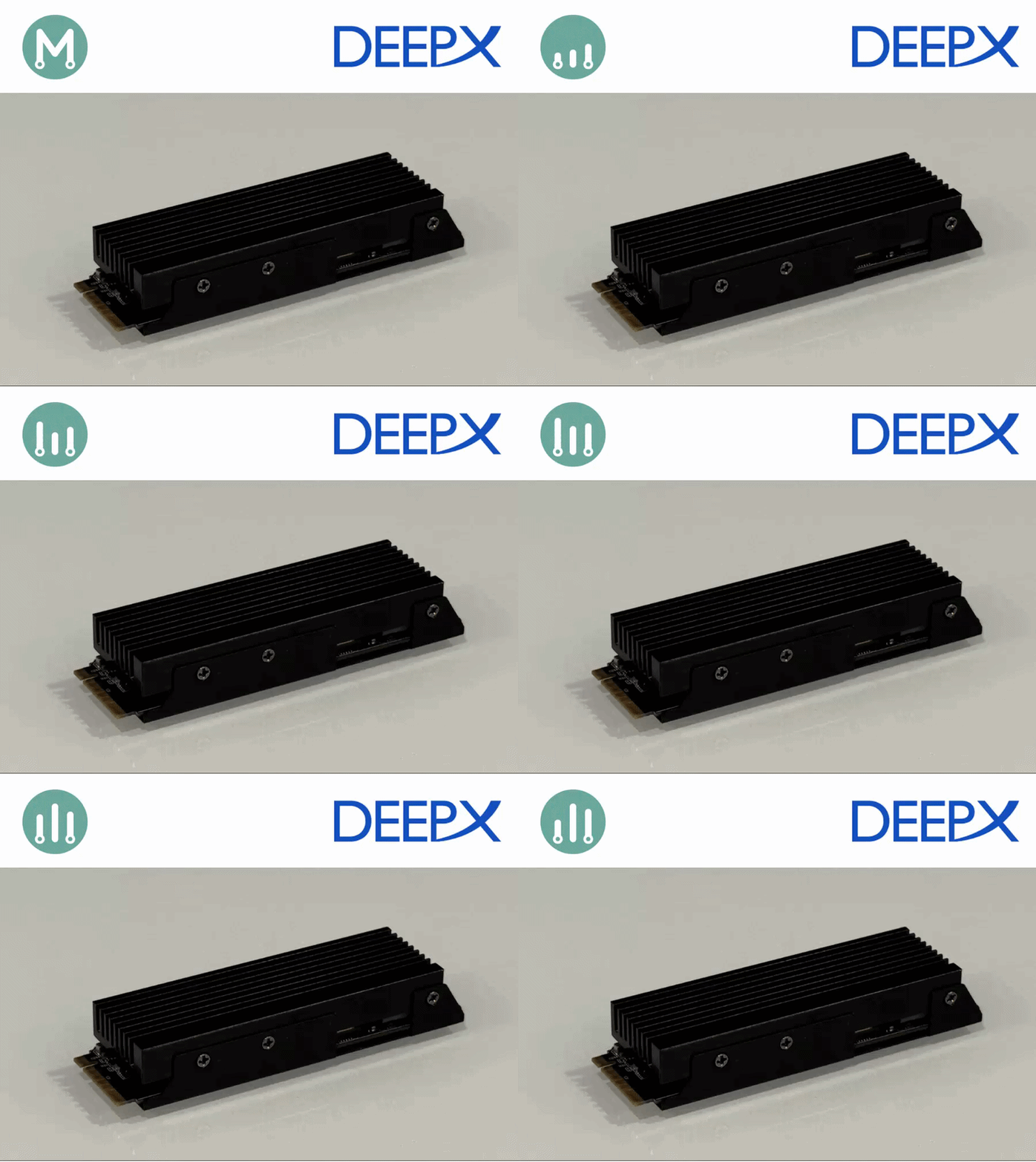
Now we apply the same methodology to the DeepX M1 M.2 acceleration module.
Installing the DeepX SDK
DeepX provides excellent instructions on installing their DX-ALL suite.
This will provide three virtual environments that can be used for:
- DX model zoo - for accessing pre-compiled models
- DX compiler - to compile to own models
- DX runtime - when performing inference
Reproducing the DeepX benchmarks
Before measuring power, I wanted to reproduce DeepX’s published benchmark. In line with the previous articles, I chose ResNet50, knowing it has the lightest post-processing stage, being a classification model.
- DeepX Model Zoo
- ResNet-50 on DeepX : 1,067 FPS, 515.02 FPS/W
Contrary to the other manufacturer’s, DeepX publishes a FPS/W metric, which we will attempt to reproduce.
Our initial target is to reproduce the benchmark of 1067 FPS.
First throughput results
In order to measure the FPS metric for the ResNet50 model, I downloaded the following files from the DeepX model zoo:
I copied these files in a bench/ResNet50 directory.
Then I launched the dx-runtime virtual environment:
$ cd dx-all-suite
$ dx-runtime/venv-dx-runtime/bin/activate

$ dxbenchmark --dir bench/ResNet50 --warmup 10 --time 30
Runtime Framework Version: v3.2.0
Device Driver Version: v2.1.0
PCIe Driver Version: v2.0.1

Device specification: 'all' (default)

=== Model File: ../bench/ResNet50/ResNet50-1.dxnn ===

Model Input Tensors:
  - input.1
Model Output Tensors:
  - 495

Tasks:
  [ ] -> npu_0 -> []
  Task[0] npu_0, NPU, NPU memory usage 36,478,720 bytes (input 150,528 bytes, output 4,000 bytes)
  Inputs
     -  input.1, UINT8, [1, 224, 224, 3 ]
  Outputs
    -  495, FLOAT, [1, 1000 ]


Profiler data has been written to profiler.json
  -------------------------------------------------------------------------------
  |           Name                 |  min (us)    |  max (us)    | average (us) |
  -------------------------------------------------------------------------------
  |   Framework Response Handling  |            2 |          236 |      6.40411 | 91, 5, 7, 5, 6, 6, 7, 8, 4, 5, 5, 5, 7, 5, 8, 6, 6, 7, 4, 6, 6, 5, 5, 5, 6, 5, 6, 6, 8, 5, ...
  |                       NPU Core |         2027 |         3272 |      2937.08 | 2031, 2992, 2973, 2966, 2961, 2929, 2990, 2943, 2958, 2924, 2993, 2965, 2943, 2935, 2900, 2986, 2981, 2855, 2940, 2926, 2974, 2907, 2959, 2926, 2943, 2935, 2964, 2911, 2915, 2970, ...
  |       NPU Input Format Handler |            3 |           93 |      4.32167 | 47, 4, 4, 5, 5, 4, 5, 5, 5, 5, 5, 5, 4, 4, 5, 5, 5, 4, 4, 5, 5, 5, 5, 4, 4, 4, 4, 4, 4, 4, ...
  |      NPU Output Format Handler |            1 |           72 |      1.05271 | 5, 1, 1, 1, 1, 1, 1, 1, 1, 1, 1, 1, 1, 1, 1, 1, 1, 1, 1, 1, 1, 1, 1, 1, 1, 1, 1, 1, 1, 1, ...
  |                       NPU Task |         2738 |        12490 |      5931.01 | 11921, 5975, 5938, 5908, 5929, 5867, 5995, 5905, 5958, 5901, 5933, 5965, 5896, 5880, 5900, 6012, 6019, 5800, 5908, 5843, 5926, 5871, 5961, 5905, 5899, 5874, 5917, 5839, 5855, 5908, ...
  |                      PCIe Read |           17 |          776 |      75.5699 | 181, 74, 75, 74, 75, 74, 78, 75, 75, 74, 75, 74, 75, 74, 76, 104, 74, 75, 74, 74, 75, 70, 74, 70, 75, 86, 69, 74, 86, 78, ...
  |                     PCIe Write |           77 |          923 |      133.779 | 242, 135, 135, 128, 130, 133, 131, 130, 139, 134, 135, 132, 131, 131, 131, 138, 137, 130, 129, 132, 135, 139, 142, 136, 138, 138, 136, 132, 132, 138, ...
  |           Service Process Wait |         2150 |    176496455 |      20435.1 | 176465205, 3006, 2986, 2979, 2975, 2943, 3006, 2954, 2976, 2939, 3004, 2982, 2955, 2948, 2911, 3005, 2995, 2867, 2951, 2946, 2984, 2921, 2971, 2941, 2957, 2951, 2981, 2927, 2928, 2987, ...
  |    dxbenchmark_ResNet50-1.dxnn |     30116404 |     30116404 |  3.01164e+07 | 30116404,
  -------------------------------------------------------------------------------
The dxbenchmark utility generates output in three formats:
- csv
- json
- html
Here is the CSV for out session:
(venv-dx-runtime) $ cat DXBENCHMARK_2026_05_11_143452.csv
Runtime Version, Firmware Version, Device Driver Version,PCIe Driver Version,Model Name,FPS,NPU Inference Time Mean,NPU Inference Time SD,NPU Inference Time CV,Latency Mean,Latency SD,Latency CV
3.2.0,2.5.0,2.1.0,2.0.1,ResNet50-1.dxnn,1009.46,2.94,0.05,0.02,5.93,0.39,0.07
Here is the JSON for out session:
(venv-dx-runtime) $ cat DXBENCHMARK_2026_05_11_143452.json
{
  "Runtime Version": "3.2.0",
  "Firmware Version": "2.5.0",
  "Device Driver Version": "2.1.0",
  "PCIe Driver Version": "2.0.1",
  "results": [
    {
      "Model Name": "ResNet50-1.dxnn",
      "FPS": 1009.46,
      "NPU Inference Time": {
        "mean": 2.94,
        "sd": 0.05,
        "cv": 0.02
      },
      "Latency": {
        "mean": 5.93,
        "sd": 0.39,
        "cv": 0.07
      }
    }
  ]
}
The most convenient output is the HTML output:
| Model Name | FPS | Avg. NPU Time (ms) | NPU Time CV | Avg. Latency (ms) | Latency CV |
|---|---|---|---|---|---|
| ResNet50-1.dxnn | 1009.16 | 2.94 | 0.016071 | 5.93 | 0.064840 |
The number of frames the model processes per second. Higher values indicate better throughput performance.
The time taken for the NPU Core to complete an inference operation. Lower values indicate faster processing on the NPU hardware.
The total time from when the host CPU requests a task until it receives the result. This includes data transfer overhead and processing time. Lower values indicate better end-to-end performance.
A measure of how spread out the data is from the mean. Lower values indicate more consistent and stable performance across multiple runs.
A normalized measure of variability, calculated as Standard Deviation divided by Mean (SD/Mean). This metric enables comparison of data dispersion between groups with different averages. Lower values indicate more stable and predictable performance.
Measuring DeepX M1 Power with mb-powermon.py
We will use the methodology that we established in Part 3, using a custom INA228 based power measurement tool.
Also, we will use the same mb-powermon.py utility we have been using throughout the series:
Within the DeepX virtual environment, install the “pyftdi”, “adafruit-blinka”, and “adafruit-circuitpython-ina228” python packages:
(venv-dx-runtime) $ pip3 install pyftdi adafruit-blinka adafruit-circuitpython-ina228
Make certain you have permission to access the enumerated FTDI USB device (the same fix-ft232h-permissions.sh script from Parts 3 and 4 applies here).
Next, launch the mb-powermon utility as follows:
(venv-dx-runtime) $ python3 mb-powermon.py --probe deepx,adafruit --csv mb-powermon-deepx-ina228-resnet50-20260511-01.csv
If we re-run the inference in a separate console:
(venv-dx-runtime) $ dxbenchmark --dir bench/ResNet50 --warmup 10 --time 30
Runtime Framework Version: v3.2.0
Device Driver Version: v2.1.0
PCIe Driver Version: v2.0.1

Device specification: 'all' (default)

=== Model File: /media/abbeefai/TheExpanse/shared_with_docker/mb-powermon/bench/ResNet50/ResNet50-1.dxnn ===

Model Input Tensors:
  - input.1
Model Output Tensors:
  - 495

Tasks:
  [ ] -> npu_0 -> []
  Task[0] npu_0, NPU, NPU memory usage 36,478,720 bytes (input 150,528 bytes, output 4,000 bytes)
  Inputs
     -  input.1, UINT8, [1, 224, 224, 3 ]
  Outputs
    -  495, FLOAT, [1, 1000 ]


Profiler data has been written to profiler.json
  -------------------------------------------------------------------------------
  |           Name                 |  min (us)    |  max (us)    | average (us) |
  -------------------------------------------------------------------------------
  |   Framework Response Handling  |            2 |          236 |      6.40411 | 91, 5, 7, 5, 6, 6, 7, 8, 4, 5, 5, 5, 7, 5, 8, 6, 6, 7, 4, 6, 6, 5, 5, 5, 6, 5, 6, 6, 8, 5, ...
  |                       NPU Core |         2027 |         3272 |      2937.08 | 2031, 2992, 2973, 2966, 2961, 2929, 2990, 2943, 2958, 2924, 2993, 2965, 2943, 2935, 2900, 2986, 2981, 2855, 2940, 2926, 2974, 2907, 2959, 2926, 2943, 2935, 2964, 2911, 2915, 2970, ...
  |       NPU Input Format Handler |            3 |           93 |      4.32167 | 47, 4, 4, 5, 5, 4, 5, 5, 5, 5, 5, 5, 4, 4, 5, 5, 5, 4, 4, 5, 5, 5, 5, 4, 4, 4, 4, 4, 4, 4, ...
  |      NPU Output Format Handler |            1 |           72 |      1.05271 | 5, 1, 1, 1, 1, 1, 1, 1, 1, 1, 1, 1, 1, 1, 1, 1, 1, 1, 1, 1, 1, 1, 1, 1, 1, 1, 1, 1, 1, 1, ...
  |                       NPU Task |         2738 |        12490 |      5931.01 | 11921, 5975, 5938, 5908, 5929, 5867, 5995, 5905, 5958, 5901, 5933, 5965, 5896, 5880, 5900, 6012, 6019, 5800, 5908, 5843, 5926, 5871, 5961, 5905, 5899, 5874, 5917, 5839, 5855, 5908, ...
  |                      PCIe Read |           17 |          776 |      75.5699 | 181, 74, 75, 74, 75, 74, 78, 75, 75, 74, 75, 74, 75, 74, 76, 104, 74, 75, 74, 74, 75, 70, 74, 70, 75, 86, 69, 74, 86, 78, ...
  |                     PCIe Write |           77 |          923 |      133.779 | 242, 135, 135, 128, 130, 133, 131, 130, 139, 134, 135, 132, 131, 131, 131, 138, 137, 130, 129, 132, 135, 139, 142, 136, 138, 138, 136, 132, 132, 138, ...
  |           Service Process Wait |         2150 |    176496455 |      20435.1 | 176465205, 3006, 2986, 2979, 2975, 2943, 3006, 2954, 2976, 2939, 3004, 2982, 2955, 2948, 2911, 3005, 2995, 2867, 2951, 2946, 2984, 2921, 2971, 2941, 2957, 2951, 2981, 2927, 2928, 2987, ...
  |    dxbenchmark_ResNet50-1.dxnn |     30116404 |     30116404 |  3.01164e+07 | 30116404,
  -------------------------------------------------------------------------------

(venv-dx-runtime) $ dxbenchmark --dir bench/ResNet50 --warmup 10 --time 30
Runtime Framework Version: v3.2.0
Device Driver Version: v2.1.0
PCIe Driver Version: v2.0.1

Device specification: 'all' (default)

=== Model File: /media/abbeefai/TheExpanse/shared_with_docker/mb-powermon/bench/ResNet50/ResNet50-1.dxnn ===

Model Input Tensors:
  - input.1
Model Output Tensors:
  - 495

Tasks:
  [ ] -> npu_0 -> []
  Task[0] npu_0, NPU, NPU memory usage 36,478,720 bytes (input 150,528 bytes, output 4,000 bytes)
  Inputs
     -  input.1, UINT8, [1, 224, 224, 3 ]
  Outputs
    -  495, FLOAT, [1, 1000 ]


Profiler data has been written to profiler.json
  -------------------------------------------------------------------------------
  |           Name                 |  min (us)    |  max (us)    | average (us) |
  -------------------------------------------------------------------------------
  |   Framework Response Handling  |            2 |          503 |      6.68873 | 70, 6, 4, 8, 6, 7, 5, 26, 6, 5, 6, 10, 6, 7, 6, 5, 5, 5, 6, 6, 5, 5, 5, 8, 8, 7, 8, 5, 8, 9, ...
  |                       NPU Core |         2026 |         3252 |      2938.09 | 2027, 2968, 2914, 2712, 2984, 2914, 2976, 2946, 2907, 2966, 2961, 2896, 2930, 2954, 2936, 2878, 2990, 2958, 2967, 2963, 2942, 2896, 2908, 2945, 2948, 2933, 2929, 2933, 2924, 2913, ...
  |       NPU Input Format Handler |            3 |          819 |      4.29283 | 76, 7, 4, 4, 4, 6, 4, 5, 4, 6, 5, 5, 5, 4, 5, 4, 5, 4, 4, 4, 4, 4, 5, 4, 5, 4, 4, 4, 4, 4, ...
  |      NPU Output Format Handler |            1 |           75 |      1.05097 | 7, 1, 1, 1, 1, 1, 1, 1, 1, 1, 1, 1, 1, 1, 1, 1, 1, 1, 1, 1, 1, 1, 1, 1, 1, 1, 1, 1, 1, 2, ...
  |                       NPU Task |         2519 |        12523 |       5932.5 | 9931, 5947, 5949, 8318, 5930, 5881, 5924, 5942, 5889, 5877, 5914, 5830, 5893, 5909, 5800, 5771, 5963, 5926, 5929, 5871, 5941, 5934, 5835, 5860, 5914, 5874, 5909, 5888, 5859, 5884, ...
  |                      PCIe Read |           17 |          947 |      75.5756 | 172, 75, 73, 95, 68, 76, 74, 81, 74, 73, 72, 77, 73, 74, 75, 74, 74, 74, 74, 74, 75, 79, 68, 75, 81, 73, 74, 74, 74, 75, ...
  |                     PCIe Write |           81 |          959 |      136.837 | 218, 129, 138, 140, 146, 139, 133, 133, 133, 134, 141, 134, 136, 134, 134, 138, 134, 135, 135, 134, 130, 135, 134, 133, 143, 140, 139, 369, 138, 142, ...
  |           Service Process Wait |         1960 |      1757837 |      3141.38 | 1729635, 2981, 2929, 2698, 3002, 2932, 2989, 2960, 2925, 2977, 2976, 2907, 2945, 2968, 2937, 2895, 3002, 2976, 2985, 2974, 2957, 2907, 2925, 2879, 2960, 2948, 2945, 2949, 2939, 2928, ...
  |    dxbenchmark_ResNet50-1.dxnn |     30123815 |     30123815 |  3.01238e+07 | 30123815,
  -------------------------------------------------------------------------------
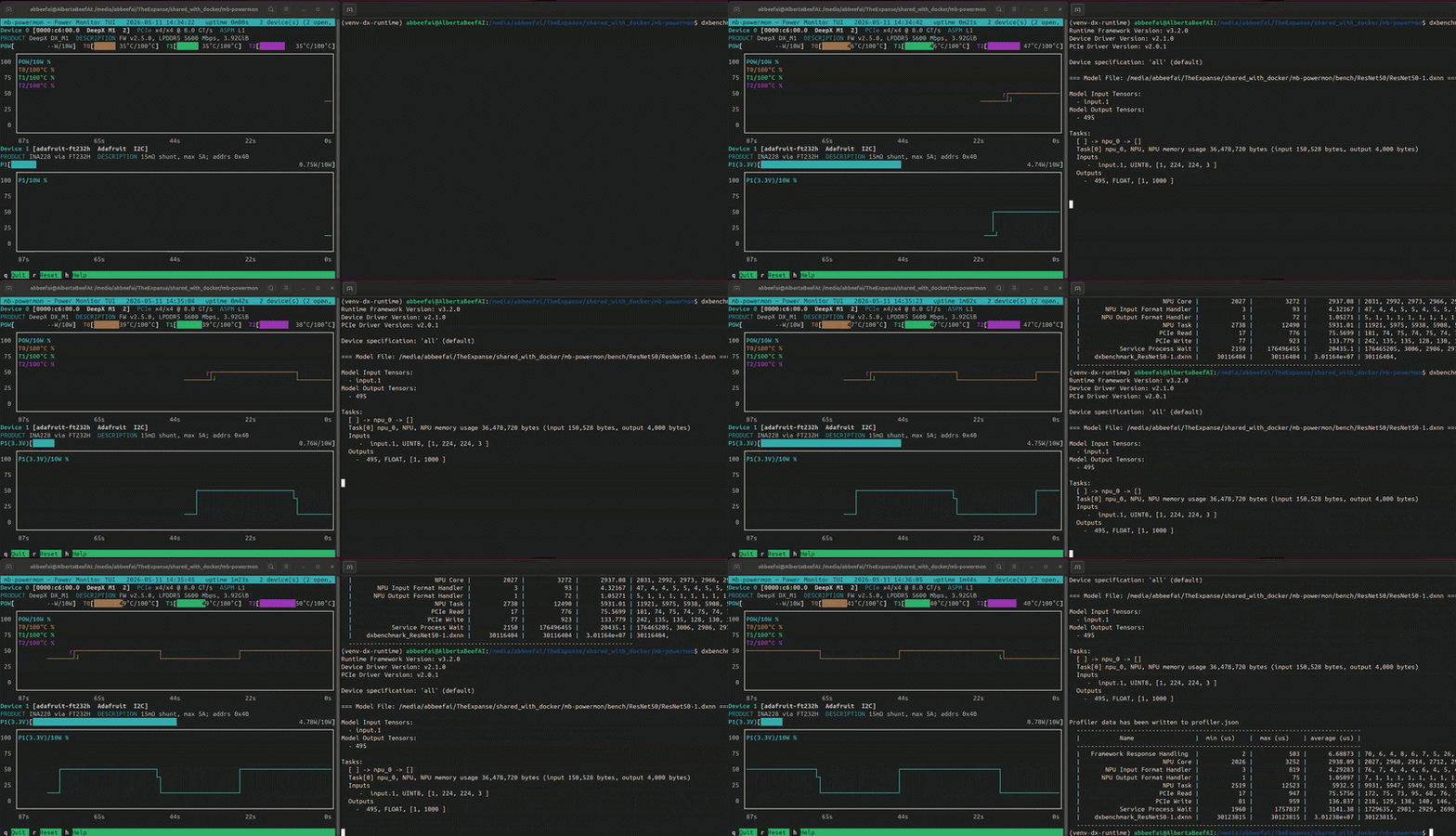
While this is running, you will see something similar to the following (video playing at 10x speed):
If we convert the output .csv file to a user-friendly .html, we can plot power and temperature for the runs:
(venv) $ python3 csv-to-html-plot.py --input mb-powermon-deepx-ina228-resnet50-20260511.csv --output mb-powermon-deepx-ina228-resnet50-20260511.html
The INA228 reports an average of ~4.7 W during the two runs, with the on-die temperature readings rising to ~47°C and ~49°C during runs.
Idle Power
For power-sensitive applications, it is useful to know what the DeepX M1 module draws when it is powered up but not running inference.
I have measured two distinct idle power levels:
- 0.74 W - ASPM L1
- 1.04 W - ASPM off
On my AMD Ryzen AI MAX+ 395 PC, which supports ASPM, the DeepX M1 module negotiated ASPM as L1. We saw in Part 1, with the Hailo-8 module, that when the module was powered down to the ASPM L1 state, the idle power reduced by an additional 300 mW. The difference we measured in this article with the DeepX module confirms that 300mW delta.
For always-on applications which are not continually performing inference, this idle power is a benchmark in itself:
| Manufacturer | Accelerator | State | ASPM | Fan | Power |
|---|---|---|---|---|---|
| Hailo | Hailo-8 (M.2) | idle | L1 | no | 0.5 W |
| Hailo | Hailo-8 (M.2) | idle | off | no | 0.8 W |
| Axelera | Metis (M.2) | idle | off | no | 2.9 W |
| Axelera | Metis (M.2) | idle | off | yes | 3.1 W |
| DeepX | M1 (M.2) | idle | L1 | no | 0.74 W |
| DeepX | M1 (M.2) | idle | off | no | 1.04 W |
Known Issues
The main issue I ran into with DeepX is the absence of a community forum. I inquired about this with my ex-colleagues in europe, and they said that a Discord channel is coming soon.
The other minor issue I ran into was not being able to reproduce the published benchmark of 1067 FPS, being 6% below at 1009 FPS.
Conclusion
In this article, we have successfully applied our power measurement methodology to the DeepX M1 M.2 module.
On resnet50, the DeepX M1 delivers ~1009 FPS at ~4.7 W — roughly 214 FPS/W.
We are just shy of the published 1067 FPS benchmark, but nowhere near the published 515 FPS/W.
The vendor confirmed that the published FPS/W metric corresponds to the NPU silicon power, not the full M.2 power rail. It therefore excludes the PCIe interface and LPDDR memory. Assuming the published FPS/W metric was taken for the case of 1067 FPS, this would correspond to the following power profile:
- NPU silicon : 1067 FPS / 515 FPS/W = 2.07W
By deduction, we can breakdown the power profile as follows:
- NPU silicon : 2.07 W
- PCIe + LPDDR : 4.75 W - 2.07 W = 2.29 W
This is very important observation to consider. A chip-down design would be 2x more power efficient.
If we compare the measured FPS/W with our results with the Hailo-8 and Axelera Metis, we have the following standings.
| Manufacturer | Accelerator | Model | Throughput | Power | Efficiency |
|---|---|---|---|---|---|
| Hailo | Hailo-8 (M.2) | resnet50 | 1371 FPS | 4.0 W | 343 FPS/W |
| Axelera | Metis (M.2) | resnet50 | 2050 FPS | 7.6 W | 270 FPS/W |
| DeepX | M1 (M.2) | resnet50 | 1009 FPS | 4.7 W | 214 FPS/W |
It is important to note that the DeepX has the lowest power consumption for the M.2 accelerators which have on-board DDR memory (Axelera Metis, DeepX M1).
| Manufacturer | Accelerator | PCIe lanes | SRAM | LPDDR |
|---|---|---|---|---|
| Hailo | Hailo-8 (M.2) | 4 | undisclosed | none |
| Axelera | Metis (M.2) | 4 | 52 MB | 1 GB LPDDR4X |
| DeepX | M1 (M.2) | 4 | undisclosed | 4 GB LPDDR5 |
What Next?
I have followed a consistent methodology for these comparative benchmarks:
- reproduce the manufacturer’s published ResNet-50 benchmark with their utilities
- use manufacturer’s provided (default) thermal solution
- measure power independently during a cold-run
- rank power efficiency based on FPS/W
That said, I still do not know exactly what is happening inside each manufacturer’s benchmarking code. An ideal comparison would use the same vendor-independent code for everything except inference.
Finally, it is important to note that benchmarking a single simple network (i.e. ResNet-50) does not tell the whole story. Some larger models simply do not fit on certain accelerators. Others contain layers that are not supported by the vendor’s software solution.
In future articles, I will explore a more diverse and representative collection of models using vendor-independent code, and also cover multi-inference cascade pipelines. This will reveal the many complex layers of edge AI benchmarking.
If there are models, applications, or thermal conditions you would like to see covered, I invite you to reach out to me at:
Vendor Engagement Disclaimer
For this article, I purchased my own DeepX M1 module.
The drafts of this article were shared with DeepX prior to publication.
DeepX made the following important clarifications:
- The published FPS/W metric corresponds to the NPU silicon power (exluding PCIe and LPDDR)
So their metric is representative for chip down designs.
Version History
| Date | Description |
|---|---|
| 2026/05/11 | Initial Draft |
| 2026/06/04 | Incorporate Vendor Feedback |