Series: Edge AI Coding
- Part 1: Increasing Productivity with Claude Code
- Part 2: Creating Custom Skills
- Part 3: Axelera Wingman (this post)
In Part 1, I explored how a custom skill can be used with a general-purpose coding assistant to increase productivity for specific tasks.
In Part 2, I scaled this up for my Edge AI development flow. I built a library of mb-* skills, one per accelerator, and used them to build mb-benchmark-gui. With it I could reproduce the published performance numbers for Hailo-8 and DeepX M1, but not for Axelera Metis.
I also ended that article with a question. Vendors have started shipping their own AI coding assistants, and Axelera’s is called Wingman. Is a vendor-specific assistant better than a general-purpose assistant equipped with my own specialized skills?
This article explores how Axelera’s Wingman was used to unlock the performance for the Metis accelerator.
What is Wingman ?
Wingman is Axelera’s agentic assistant for the Voyager SDK.
In terms of what you’d actually do with it, Axelera frames four main use cases:
- end-to-end application building (describe a model and its pre/post-processing or a cascaded pipeline, and Wingman assembles a working CV pipeline)
- performance optimization (compiler configurations and speed-up suggestions)
- debugging (configuration errors, device enumeration problems, models that fail to compile)
- answering questions about supported operators, APIs and configuration syntax with worked examples rather than doc links.
Voyager Wingman can be used in three ways:
Web-based chat
Wingman gives users direct access to Axelera’s SDK, documentation and software repository through a chat window. It runs on a freemium model with a free credit allowance to get started, and because it’s a hosted service, its knowledge updates automatically as Axelera ships new Toolkit releases.
Standalone desktop app
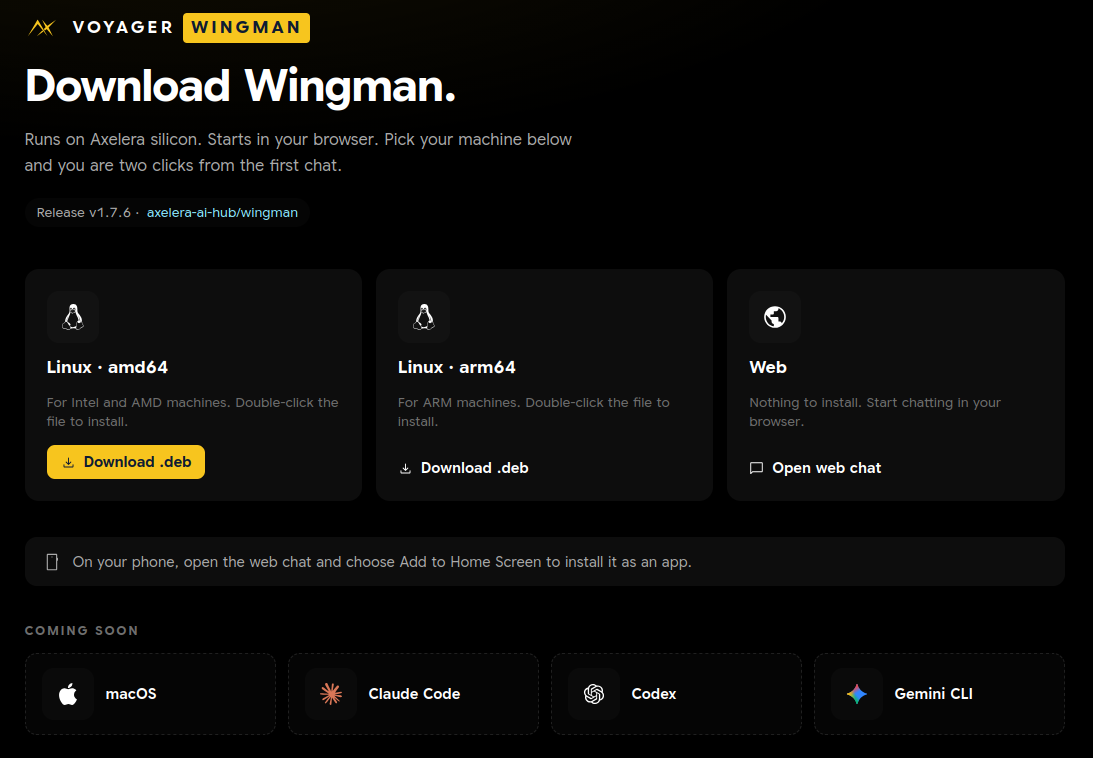
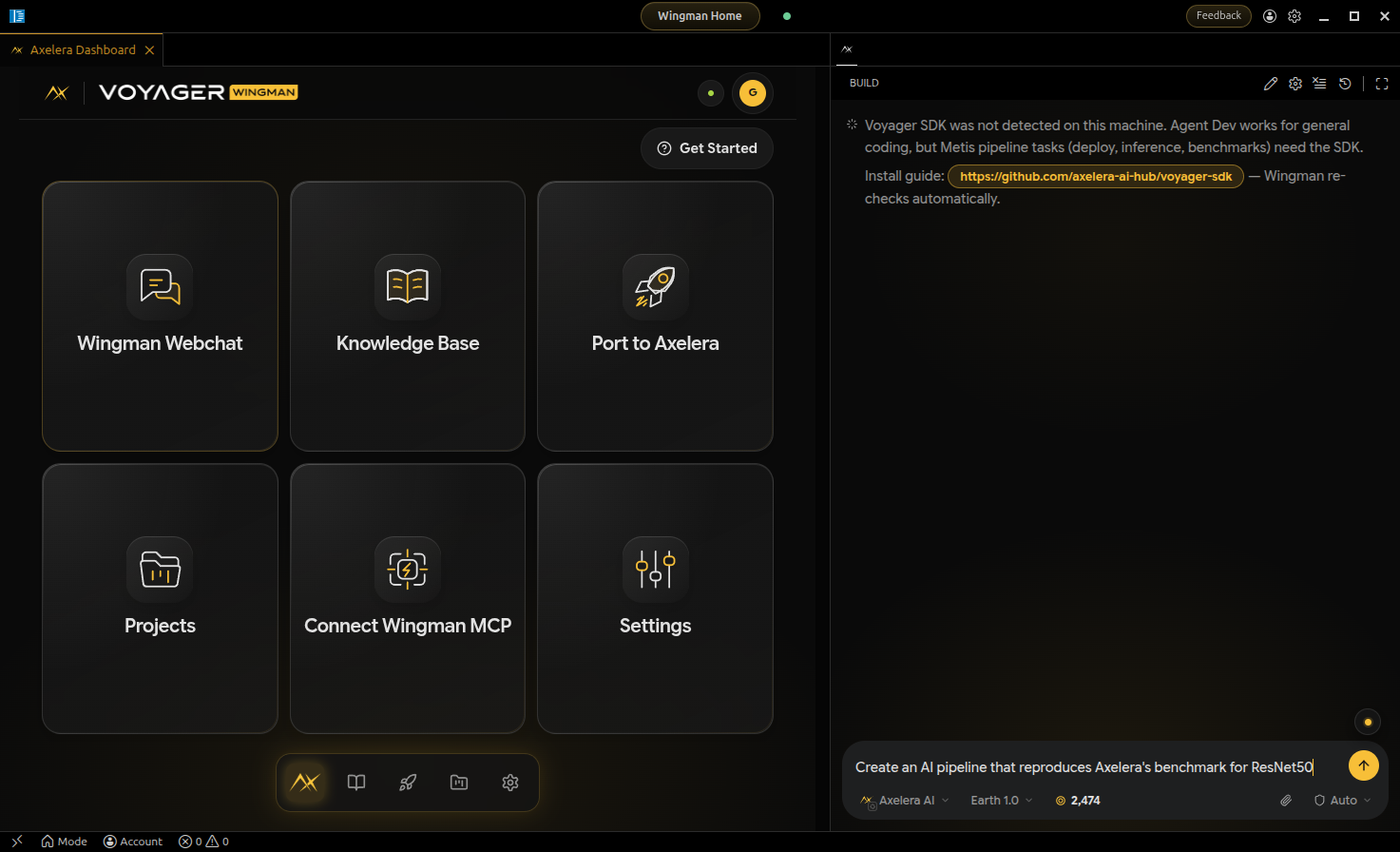
The app is free for developers who bring their own API key. It’s distributed via GitHub Releases as Debian packages for amd64 and arm64 (current release v1.4.0), plus an install-wingman.sh script. A macOS app is listed as coming in a later release. The app also includes a “Port to Axelera” button that migrates an existing NVIDIA or Hailo computer vision project over without rebuilding it from scratch.
Wingman as an MCP server
Wingman is also a hosted MCP server. In this form, there is no model to download and no local install. You point Claude Code at an endpoint and authenticate over OAuth on first use:
claude mcp add --transport http wingman https://mcp.wingman.axelera.ai/mcp
Two things then appear in the session.
The first is a set of retrieval tools over Axelera’s own material: rag_search_knowledge_base and rag_search_code_examples, scoped by source, plus project and document tools for recording findings.
The second is a suite of 16 skills, installed into ~/.claude/skills/ and named wingman-*:
wingman-launch          wingman-deploy         wingman-add-model
wingman-run             wingman-bench          wingman-new-pipeline
wingman-debug           wingman-build          wingman-new-app
wingman-list-models     wingman-test           wingman-voyager-help
...
The structure is immediately familiar. This is the same pattern I described in Part 2 : a description line that decides when the skill loads, a body that carries the payload. The advantage is that Axelera maintains them.
Which did I use ?
I only discovered that Wingman was available as an MCP server after my exploration, while writing this article. I used the Standalone desktop app for my exploration.
Both the web chat and the app are reachable through the Axelera Developer Community and Customer Portal.
The Issue I Wanted to Fix
In my benchmarking application (mb-benchmark-gui), my harness ran ResNet-50 on the Metis M.2 across one to four AIPU cores. The curve flattened badly:
| Cores | FPS |
|---|---|
| 1 | 358.7 |
| 2 | 574.0 |
| 3 | 658.6 |
| 4 | 694.9 |
Doubling from one core to two bought 60%. Going from two cores to four bought another 21%.
I remember that when this code was implemented, Claude Code and I concluded that an instance occupied exactly one core, so to use four cores we needed to run four instances. Since, at the time, this was the highest FPS I was achieving, this conclusion crept its way into my mb-axelera skill. As we will see later, this conclusion was incomplete, and an API usage error prevented the four AIPU cores from being active in one instance.
First, a Reference Point
Before asking Wingman anything about my code, I asked it to reproduce Axelera’s published benchmark on my machine.
It generated a self-contained benchmark pack. A shell script activates the Voyager SDK environment, confirms axdevice can see the card, downloads an isolated prebuilt four-core artifact, and runs inference.py with four repeated streams, OpenCL enabled and --aipu-cores 4. It also wrote a verification layer around the run, which it called truth gates:
"truth_gates": {
  "command_exit_zero": true,
  "end_to_end_fps_measured": true,
  "four_stream_pipeline_seen": true,
  "opencl_stage_seen": true
}
Those gates parse the log and confirm the run actually did what it claimed: four qtdemux elements really appeared in the pipeline, the OpenCL transform stage was really used, and an end-to-end FPS figure was really measured rather than assumed. A benchmark that checks its own evidence is not something I had thought to ask for.
It ran on the first attempt:
End-to-end average measurement                                   1,933.1
Core Temp  : 42.0°C
CPU %      : 6.0%
End-to-end : 1933.1fps
Latency    : 24.9ms (min:15.6 max:31.3 σ:1.4 x̄:25.0)ms
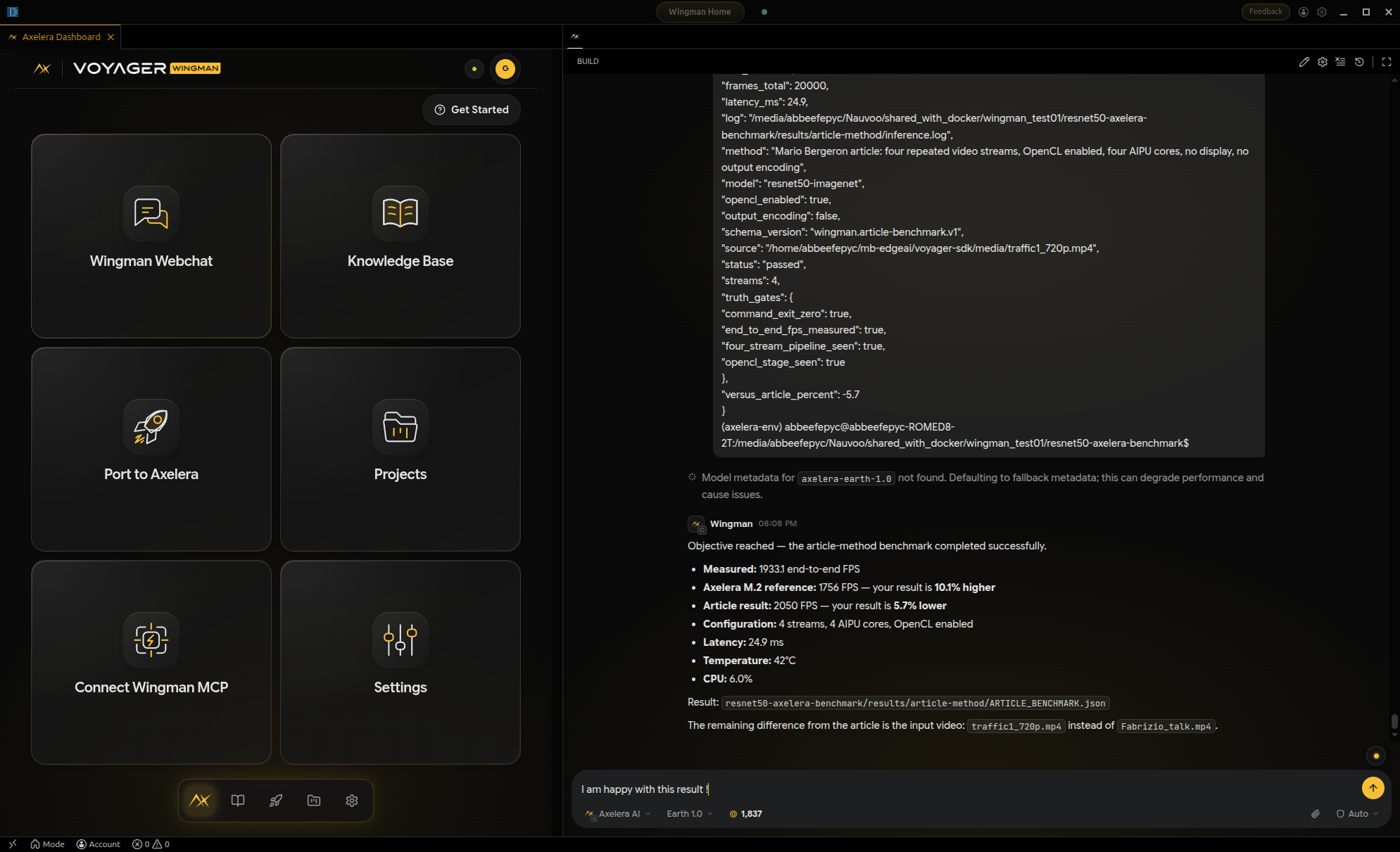
1933.1 FPS, on the same AMD EPYC (Milan) PC where my own harness was stuck at 694.9 FPS. Axelera’s published M.2 figure is 1756 FPS, so the benchmark did not merely reproduce it, it came in about 10% ahead. That makes twice now. In Part 4 I surpassed the same published number on a Ryzen AI MAX+ 395, and concluded that the host sets the ceiling rather than the Metis chip. A second machine, and the published figure is beaten again.
That settled the important question before any debugging started. The card was fine, the driver was fine, the SDK was fine, and the host was fine. Whatever was wrong was specific to the harness in my mb-benchmark-gui application.
The Two Topologies
I described the symptom to Wingman : my own harness was reaching 694 FPS on the same card that had just delivered 1933 FPS through its script, despite using the 4 AIPU cores.
Wingman quickly identified how the current code was implemented, in contrast to how it should have been implemented to unlock the maximum performance. I asked for a visual representation, which made the situation crystal clear.
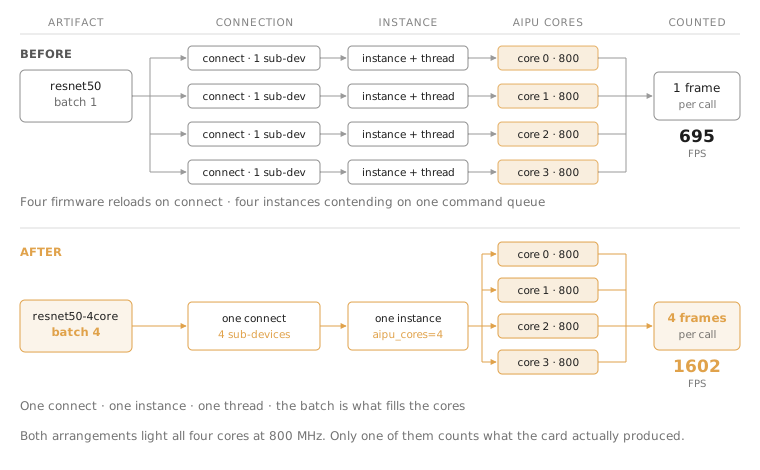
The same four cores, reached two ways. The old path bought concurrency with four connections and four instances competing for a single command queue. The new path loads the artifact Voyager already compiled for four cores and lets the batch occupy them.
Getting from the top row to the bottom row meant fixing a single API usage error, and Wingman found it.
The Missing Property
The Metis runtime has two properties with a confusingly similar meaning.
axr_device_connect() takes a num_sub_devices argument that says how many sub-devices the connection reserves. Separately, axr_load_model_instance() accepts an aipu_cores property that says how many the instance may actually use.
Set only the first, and the other three cores really do sit parked at 50 MHz:
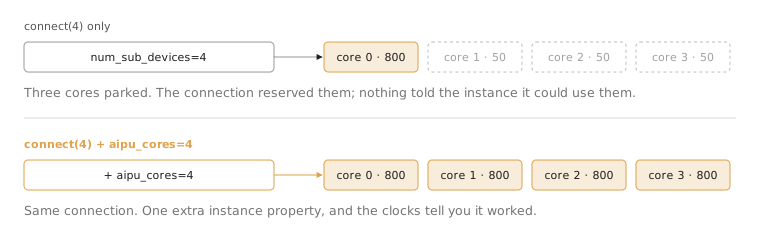
Two properties, two different questions. Set only the connection’s and three cores sit at 50 MHz, which is exactly the evidence that led me to write down “an instance occupies exactly one core” as a finding. It was never true; the property was just missing.
Wingman pointed me at the SDK’s own examples/axruntime/axruntime_example.cpp, which sets both:
input_dmabuf=0;num_sub_devices=N;aipu_cores=N
That one line is the whole fix. And it is worth being precise about where my error lived, because this is a series about skills.
Here is Rule 2 from my own mb-axelera skill, as I wrote it with Claude Code:
# Wrong: the cores are reserved on the connection, and the instance
# is never told it may use them:
L2_PER_CORE = 1_500_000
aipu_cores = max(1, -(-l2_const_size // L2_PER_CORE))   # ceil-div

conn = ctx.device_connect(device, num_sub_devices=aipu_cores)
model_instance = conn.load_model_instance(model)         # <-- no properties
I had computed the right number. I had even named the variable aipu_cores. Then I passed it to num_sub_devices and handed the instance nothing. The property actually called aipu_cores was never set at all.
That is not a subtle misreading of the API. It is a rule in a skill that a coding agent loads and follows, and it had been quietly producing three parked cores in everything I built on top of it since.
An incorrect rule will consistently handicap your productivity.
What It Was Worth
With aipu_cores set, a single connection and a single instance load the artifact Voyager already compiled for four cores:
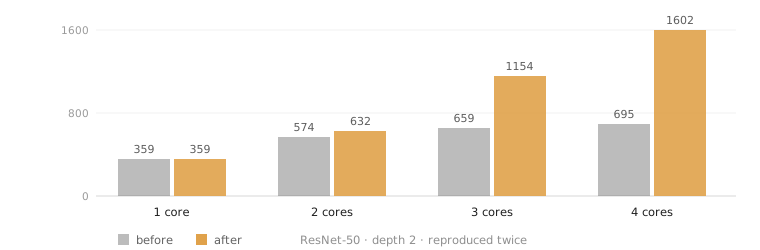
Near-linear where it used to saturate. At one core the two paths are the same code and agree to within noise, which is the control. The old curve flattens after two cores, the signature of four instances fighting over one command queue, while the new one keeps climbing.
The N-core builds are fixed-batch-N artifacts, so one invocation processes N frames, and the harness counts frames rather than invocations.
Measured 2026-09-03 on an AMD EPYC (Milan) PC, ResNet-50, queue depth 2, reproduced twice:
| Cores | Before | After | Invocations/s | Gain |
|---|---|---|---|---|
| 1 | 358.7 | 359.3 | 359 | n/a |
| 2 | 574.0 | 631.6 | 316 | 1.10× |
| 3 | 658.6 | 1153.9 | 385 | 1.75× |
| 4 | 694.9 | 1601.5 | 400 | 2.31× |
The invocation column is the one that explains the rest. It barely moves. A batch-4 call costs about what a batch-1 call costs, 2.50 ms against 2.78 ms, because the four cores work the batch in parallel. That is what the multicore artifact is for, and it is why the speedup against one core comes out slightly superlinear at 4.46×: per-invocation overhead is amortized across four frames instead of paid four times.
2.31× at four cores, on the same silicon, the same model, and the same afternoon.
Wingman vs. mb-skills
So … is the vendor assistant better than a general-purpose assistant with my own skills?
For this use case, unambiguously yes.
Wingman knew the runtime’s property table because Axelera wrote the runtime’s property table. No amount of careful note-taking on my side was going to produce aipu_cores out of a symptom, because my notes already contained a confident but incorrect explanation for that symptom. A general-purpose coding assistant reading my skill would have been led by it, exactly as I was.
This was an API usage bug. The solution was specific to the Voyager SDK, and Wingman had the knowledge that my own notes lacked.
I will continue to maintain and use my custom mb-* skills because they were created with a benchmarking and comparative mindset.
My first take-away here is that I need to incorporate a review process in my flow. A vendor’s specialized coding assistant like Wingman is the perfect candidate to review my custom skills.
Your own skills know your methodology better than they ever will.
Wingman Desktop App vs. Wingman MCP Server
My second take-away is that I did not like the user experience for the Axelera Wingman desktop app.
I did not succeed in configuring Wingman to directly access the M.2 Metis accelerator module. I had to manually run scripts in a separate console. To be fair, it is probably a user configuration/setup issue.
Instead of attempting to resolve this issue, I will explore using the Wingman MCP server in my existing LLM harness.
Conclusion
I started this series arguing that struggle is worth capturing. Part 1 captured a single recipe, Part 2 captured a methodology, but this article revealed a failure mode. Capture the struggle accurately, and you get a force multiplier. Capture it wrong, and you have automated a mistake.
At a minimum, use the vendor’s coding assistant, when available, to review your process.
Axelera’s Wingman took mb-benchmark-gui from 694.9 FPS to 1601.5 FPS on ResNet-50, a 2.31× gain on the same machine, the same model, and the same afternoon. That is the number I trust, because nothing but my own code changed between the two runs.
The first step had already answered the bigger question. Through Axelera’s own pipeline, on this machine, the card reproduces the published benchmark and then some. Nothing about the hardware, the driver or the SDK was ever in doubt after that run.
What is left is narrower. mb-benchmark-gui reaches 1601.5 FPS where Wingman’s generated benchmark reaches 1933.1 FPS on the same machine. Some of that is pipeline, since inference.py runs a full GStreamer path with hardware-accelerated decode and OpenCL preprocessing and my harness does not. How much is pipeline and how much is still my code is unresolved, and it is a separate problem from the one this article set out to fix.
What’s Next ?
The gap between mb-benchmark-gui and Axelera’s own pipeline is still open. I have a same-machine reference now, which is the part I was missing, so the next step is to work out how much of that 17% is the GStreamer path and how much is still my harness.
In the next article I will look at DeepX’s dx-agent-dev, the other vendor assistant I mentioned in Part 2, and see whether the same pattern holds: vendor ground truth closing a gap that my own skills could not.
I am also curious whether it finds something wrong in mb-deepx. On the evidence so far, I should assume it will.