Series: Edge AI Coding
- Part 1: Increasing Productivity with Claude Code
- Part 2: Creating Custom Skills (this post)
- Part 3: Axelera Wingman
In Part 1, I described how creating a skill can improve productivity with AI coding assistants, by capturing working recipes for specific tasks. We covered the simple case of creating an OpenCV-based frame navigation user interface.
This article applies the same concept at a larger scale. I will describe how I created a library of skills for my development with Edge AI accelerators.
Structuring the Skills
The mb-opencv-navigation skill from Part 1 was a single, self-contained recipe.
For the case of Edge AI benchmarking, the same struggle-to-skill pattern can be applied for each of the vendors. Each vendor has its own version of:
- model zoo
- compilation (and quantization) flow
- driver, runtime, and APIs
I wanted to capture this knowledge, especially the struggles I already ran into, in order to increase my productivity.
The mb-* Naming Convention
All of my custom skills share a common prefix: mb- (for Mario Bergeron).
This is purely cosmetic, but allows me to see my skills when I type “/mb-” in AI coding agents, thanks to the tab-completion.
Following the same convention, I grouped all my skills under a “mb-skills” umbrella.
mb-skills
├── mb-opencv-navigation
├── ...
├── mb-axelera
├── mb-deepx
├── mb-hailo
├── mb-memryx
├── ...
├── mb-qualcomm
└── mb-vitisai
Skill Anatomy
Every skill in the mb-skills library follows the same structure:
mb-skills
└── mb-<vendor>
    ├── SKILL.md              # frontmatter description + main body
    └── references/
        ├── compilation.md    # compile-time notes
        ├── model-zoo.md      # per-model decode-boundary info
        └── runtime.md        # runtime pipeline + telemetry
The reason each skill is broken out into separate subjects is to keep the context as small as possible. The main SKILL.md is kept small, and describes when to load the sub-topics (compilation.md, model-zoo.md, runtime.md).
If this was not done, the entire skill would populate the context of the AI coding assistant, wasting tokens. Using this structure, only the relevant skill knowledge is pulled into the conversation.
Vendor Skills — One per Accelerator
| Skill | Vendor | Accelerator |
|---|---|---|
mb-axelera | Axelera AI | Metis (M.2) |
mb-deepx | DeepX | DX-M1 (M.2) |
mb-hailo | Hailo AI | Hailo-8 (M.2) |
mb-memryx | MemryX | MX3 (M.2) |
I asked AI to provide a short summary for each skill … here is what it generated. Although not a perfect summary, it gives a glimpse of the struggles I ran into and captured into the skills.
mb-axelera — Covers the Voyager SDK at both compile-time (axelera.compiler) and runtime (axelera.runtime). Most of the skill’s rules are layer-level gotchas: the channel-axis-64 Pad alignment constraint that breaks MediaPipe Blaze ports, the YOLOX Space-to-Depth quirk, and the YOLOv8-COCO compressed-logits bug that silently produces zero detections. It also documents Axelera’s linear-only partitioning (unlike Vitis-AI, you cannot inject a CPU op mid-graph — one unsupported layer fails the whole compile), and the manifest-driven quantize → pad → run → unpad → dequantize pipeline that runs on host CPU.
mb-deepx — Covers the DeepX M1 NPU via the dx-all-suite SDK — the dxcom compiler (which drives from a JSON config rather than a Python API), the dx_engine Python runtime, the C++ DX-RT stack, and dxrt-cli for telemetry. The skill captures the two-venv split (compiler and runtime cannot share an environment), firmware-version dependencies between dx-rt and the M1’s flashed firmware, and DX-COM 2.2.0’s automatic CPU-fallback partitioning that silently produces hybrid graphs when an op isn’t NPU-supported. It also documents the surrounding DeepX ecosystem — DX ModelZoo, DX-Stream, DX-APP, DX-TRON — since integration typically pulls in more than just the compiler and runtime.
mb-hailo — Covers both the HailoRT runtime SDK (Python: hailo_platform) and the Dataflow Compiler (DFC, hailo_sdk_client) that produces .hef binaries. The skill’s biggest surface is the HEF compile flow — parse, optimize, compile — plus the model-script pitfalls that trip up almost every port. It also captures Hailo-specific telemetry conventions like NUL-padded identify strings and firmware-averaged INA231 power measurement, and documents when a HEF ships with NMS baked in vs. when the decode has to happen on the host.
mb-memryx — Covers the MemryX SDK via memryx.NeuralCompiler (producing .dfp Dataflow Programs) and the MxAccl C++ runtime (with the pyaccl Python API still in preview). To prevent fabric thrashes between models in cascade pipelines, group co-running models into a single multi-model .dfp — with one model per .dfp. It also documents the two independent per-chip resource budgets (compute cores AND weights-memory, which bound different models differently — osnet is core-bound, YOLO detectors are weight-bound), the autocrop behaviour that silently strips input transpose+normalize to the host, the mxa-manager daemon that owns the chip and serves clients over IPC, on-board per-chip power and thermal telemetry via memryx.mxa.get_*(), and the v2.3 API deprecation cliff that the skill tracks so ports don’t get stuck on the wrong side.
These summaries are an interesting glimpse, but don’t capture everything the skills contain.
Capturing my knowledge
In my case, I started building these skills from the code I had already written. During the last several years, I read a LOT of vendor documentation and wrote a LOT of model compilation and model inference code, so my GitHub repositories were the perfect place to capture knowledge on this subject:
Recent projects:
Hackster projects:
- Accelerating the MediaPipe models with Qualcomm
- Accelerating the MediaPipe models with MemryX
- Accelerating the MediaPipe models with Hailo-8
- Accelerating the MediaPipe models with Vitis-AI 3.5
- Tria Vitis Platforms - Adding support for Hailo-8
- Tria Vitis Platforms - Adding support for Vitis-AI 3.5
- Supercharge your ZUBoard with the Hailo-8 AI Accelerator
GitHub repositories:
Capturing the vendor’s knowledge
For the case of DeepX, I had not explored their solution yet, so had nothing to contribute to this skill.
Instead, I went to their web site and asked their chatbot to distill its knowledge on the three subjects (compilation, model-zoo, runtime) in markdown format, specifying that I was going to use this to create a skill for use in Claude Code.
The chatbot did not push back on my request, and gladly provided the starting point for my skill.
The Skill Lifecycle
None of these skills sprang into existence fully-formed. Each one started small and grew as I ran into new struggles.
As I quantize and compile models for each vendor, I am explicit about consulting the skills, and updating them after completion of the task, especially when struggles are encountered.
When I build AI pipelines using models from each vendor’s model zoo, I make note of any vendor-specific particularities. Do they accelerate the entire model ? Or have they dropped a few layers at the end of the model ?
Runtime is a broader subject, and I keep the skill up to date with driver and runtime installation (on Ubuntu versus via Yocto recipes), as well as inference in Python and C++, using their synchronous APIs and asynchronous APIs.
Runtime also includes the telemetry (power, temperature) that each vendor provides for their accelerator modules.
My mb-skills repository
I have my skills in a GitHub repository. This is a private repository, since some of the content may be sensitive information.
If you are interested in getting access to my skills, let me know at:
Installing and using the mb-skills
In Claude Code, I install this as a plugin marketplace, pointing to my local clone of the repository:
/plugin marketplace add {path}/mb-skills
I can then install all or a group of skills with one of the following commands:
/plugin install mb-skills-all@mb-skills

/plugin install mb-accelerators@mb-skills

/plugin install mb-axelera@mb-skills
/plugin install mb-deepx@mb-skills
/plugin install mb-hailo@mb-skills
/plugin install mb-memryx@mb-skills
Using the mb-skills
One interesting example I recently created using these skills was related to power and temperature telemetry.
I was able to create a utility called mb-powermon-gui which allows the user to view the power and temperature for the accelerators they have populated in their system:
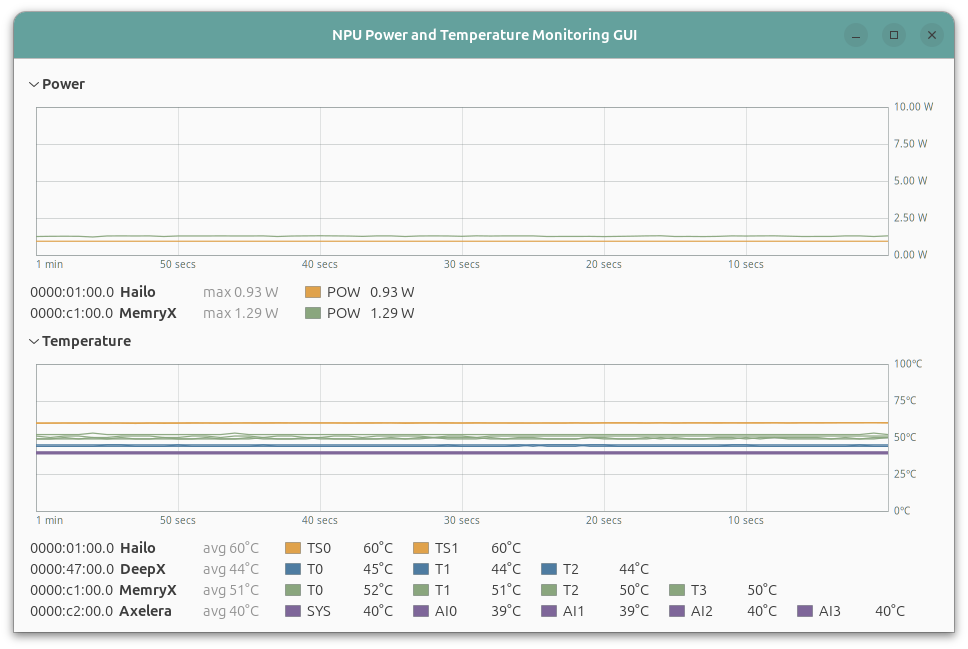
This captures well how all the AI accelerators I’ve worked with have temperature telemetry available, but only Hailo and MemryX have power telemetry.
For the two accelerators without power telemetry, we can leverage the power measurement methodology described in a previous article (Measuring Edge AI Power with INA228). This allows us to capture power and temperature telemetry for each AI accelerator.
A more advanced example, mb-benchmark-gui, augments the previous telemetry monitoring application with benchmarking, including frame rate, power efficiency, etc.
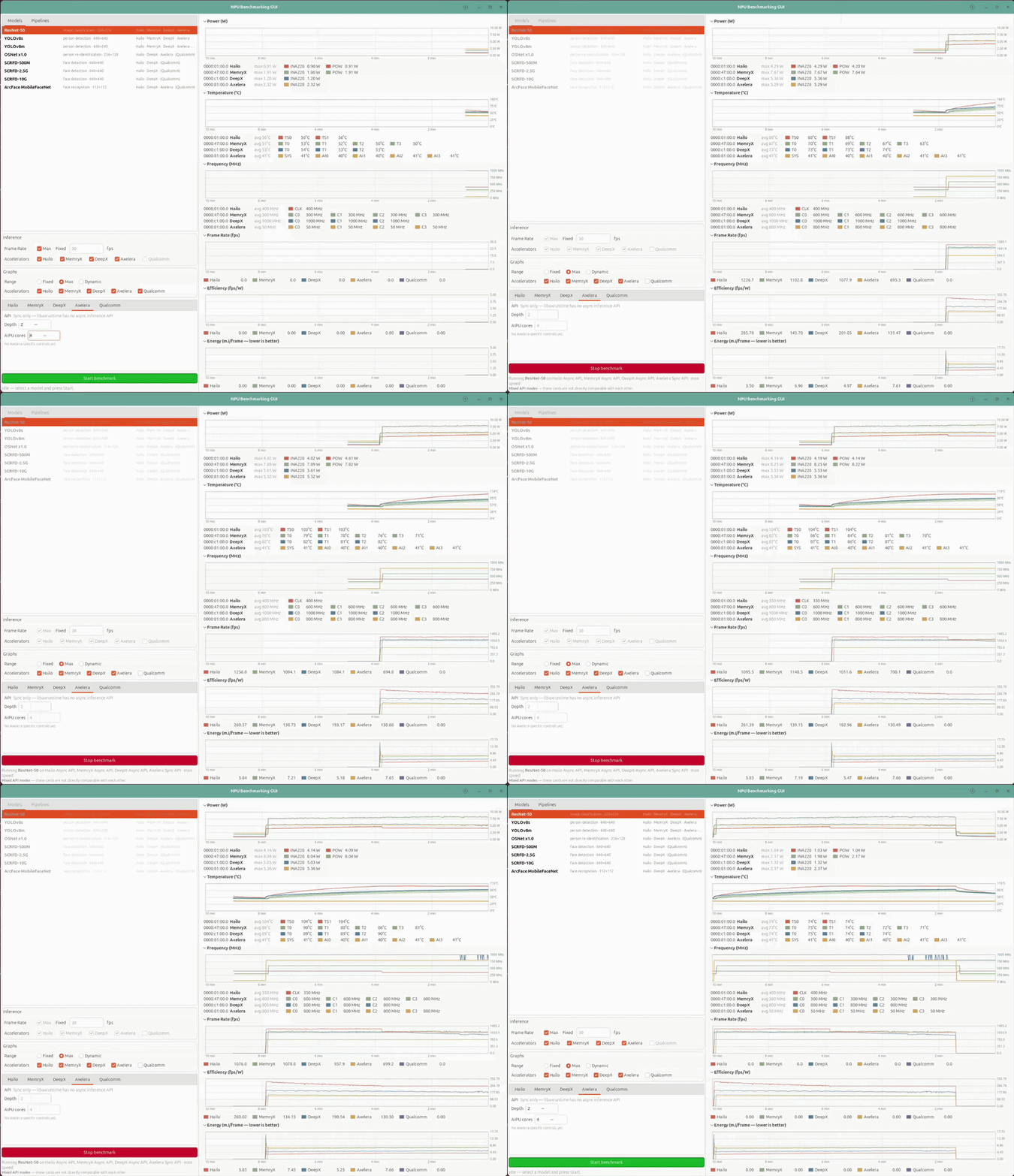
In the animation, we can observe that both Hailo and DeepX reach temperatures that trigger their thermal throttling after a few minutes. This scales down their operating frequency, until they reach a stable state, where real performance and power efficiency can be measured more meaningfully.
This latest application is still a work in progress, but each of the inference pipelines was implemented with an AI coding assistant, as well as my mb-skills.
Conclusion
This article describes a methodology of using custom skills to increase productivity. I concentrated specifically on Edge AI development, and have seen a lot of productivity gains in my development flow with these mb-skills.
To this day, I have not written a single line of code for DeepX, yet I am as productive with their DX-M1 as I am with Hailo-8, MemryX MX3, and Axelera Metis.
However, there is still a blind spot. For example, in my mb-benchmark-gui, I was able to reproduce the performance results of Hailo, DeepX and MemryX, but not those of Axelera. I hope to resolve this using the vendor’s specific AI coding assistant in the next article.
What’s Next?
Recently, certain AI accelerator vendors have been making available specialized AI coding assistants for the development flow.
- Axelera : Wingman
- DeepX : dx-agent-dev
Are these vendor-specific solutions better than a general-purpose assistant equipped with specialized skills ?
I take a first look in Part 3, where I put Axelera’s Wingman to work on the benchmark it could not reproduce.